Search This Blog

Thursday, August 19, 2010

"Beautiful Horizon"

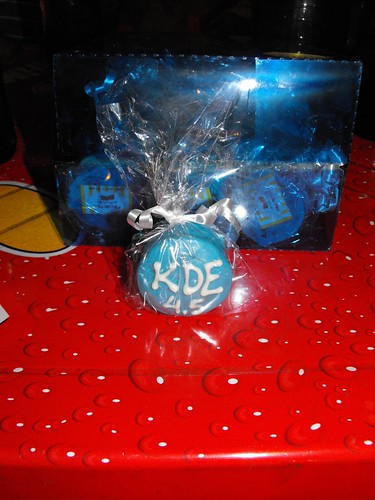
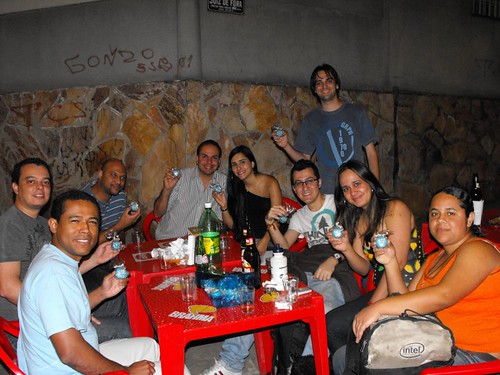
That is the English name of Belo Horizonte, the city where my fellows from KDE-MG group and I celebrated the 4.5 releases of KDE software. At the release party for 4.4 we tried to bring a cake, but it did not work out. This time Tulio, KDE-MG's member, made a surprise for us and brought some fashion, and taste, honey breads:


It was a pleasure night in Belo Horizonte, "Frango Frito" was crowed of people, I have never seen it that crowed before. Not all members of KDE-MG could attend the release party this time, well, they lost the honey breads hehe:


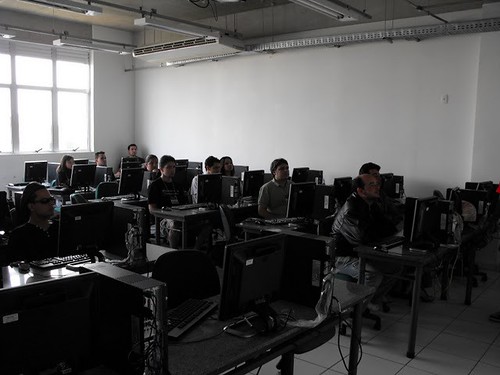
The release party was also a meeting to finish the details for the 3th Free Software Festival Belo Horizonte (FSLBH), which happened last Saturday in Betim, a city close to Belo Horizonte. This year we had help from the Betim Opensource guys to organise the FSLBH/Betim and to talk to the Pitagoras university to hold the event and hand over the computer classrooms for the mini-courses. Many thanks to them.

During the event we had lectures about free software and some mini-courses, including mine of Qt programming. I used the material created by Sandro and Tomaz from Liveblue, thanks to them.


We also distributed some gifts during the event:


The event last one day and it was for free. This time we asked the participants to bring toys to be distributed to a charity institution in Belo Horizonte:


FSLBH is becoming a recurrent event in Belo Horizonte, one the biggest cities in Brazil with several information technology universities. The KDE community is also increasing :-)

More pictures of the FSLBH, release parties and other events are available at the KDE-BR's flicker homepage.

Wednesday, August 18, 2010

Hotkey buttons and udev

As many notebooks out there mine has some hotkey buttons for (de)activate the wifi card, bluetooth controller, webcam, etc. With the buttons sometimes the notebook also has leds to indicate which hardware is activated at the moment, unfortunately my notebook only has leds for wifi and bluetooth, not for the webcam. More unfortunately yet the leds for wifi and bluetooth is the same led but with different color to indicate when only one of them are activated, but I must say Clevo, the manufacturer of my notebooks' barebone, did not make a good choice selecting the colors orange and green :-( It is very difficult to distinguish between the states wifi on / bluetooth off and wifi off / bluetooth on. Even the state wifi on / bluetooth on is not easy to notice. To minimize that problem I created some udev rules and some scripts to open a KDE notification dialog every time they are activated or deactivated. Everybody in Linux "world" must have heard of udev, the system daemon which receives events from the kernel and run programs or scripts based on rules storared in /etc/udev/rules.d or /lib/udev/rules.d. In my case I added my rules to /etc/udev/rules.d:
File /etc/udev/rules.d/50-lvs-rfkill.rules
SUBSYSTEM=="rfkill", RUN+="lvs-rfkill.sh"
File /etc/udev/rules.d/50-lvs-webcam.rules
# Change the idProduct and idVendor attributes to your camera's.
# Use lsusb to find them.
SUBSYSTEM=="video4linux", ATTRS{idProduct}=="0343", ATTRS{idVendor}=="5986", RUN+="lvs-webcam.sh"
Then run this to reload the rules:
Reload udev rules
udevadm control --reload-rules 
Now we need to create the scripts lvs-rfkill.sh and lvs-webcam.sh and give execution permission to them (chmod 755):
File /lib/udev/lvs-rfkill.sh
#!/bin/sh

find_display()
{
    if [ -r "/proc/$1/environ" ]
    then
        perl -ne 'if ( /DISPLAY=([^:]+){0,1}(:\d+)(.\d+){0,1}/ )
         { print "$1$2$3\n"; }' < /proc/$1/environ
    fi

    return 0
}

user_loop()
{
    OLD_DISPLAY=$DISPLAY
    ps -C kwrapper -C kwrapper4 h -o pid,user | while read pid user
    do
        grep -q ksmserver /proc/$pid/cmdline &> /dev/null || continue
        export DISPLAY=$(find_display $pid)
        su - $user -c "$1"
    done
    export DISPLAY=$OLD_DISPLAY
    unset OLD_DISPLAY
    sleep 1
}

title=
msg=
case $RFKILL_TYPE in
    wlan)
        title="Wireless"

        case $ACTION in
            add|change)
                case $RFKILL_STATE in
                    0)
                        msg="Wireless disabled"
                    ;;
                        
                    1)
                        msg="Wireless enabled"
                    ;;

                    2)
                        msg="Wireless disabled by hardware"
                    ;;
                esac
            ;;

            remove)
                msg="Wireless disabled"
            ;;
        esac
    ;;

    bluetooth)
        title="Bluetooth"

        case $ACTION in
            add)
                msg="Bluetooth enabled"
                echo 1 > /sys/$DEVPATH/state
            ;;

            remove)
                msg="Bluetooth disabled"
            ;;
        esac
    ;;
esac

if [ "$msg" != "" ]
then
    user_loop "$(ls /usr/kde/*/bin/kdialog | tail -n 1) \
        --title \"$title\" --passivepopup \"$msg\" 3"
fi
File /lib/udev/lvs-webcam.sh
#!/bin/sh

find_display()
{
    if [ -r "/proc/$1/environ" ]
    then
        perl -ne 'if ( /DISPLAY=([^:]+){0,1}(:\d+)(.\d+){0,1}/ )
            { print "$1$2$3\n"; }' < /proc/$1/environ
    fi

    return 0
}

user_loop()
{
    OLD_DISPLAY=$DISPLAY
    ps -C kwrapper -C kwrapper4 h -o pid,user | while read pid user
    do
        grep -q ksmserver /proc/$pid/cmdline &> /dev/null || continue
        export DISPLAY=$(find_display $pid)
        su - $user -c "$1"
    done
    export DISPLAY=$OLD_DISPLAY
    unset OLD_DISPLAY
    sleep 1
}

title="Webcam"
msg="Webcam"

case $ACTION in
    add)
        msg="$msg enabled"
    ;;

    remove)
        msg="$msg disabled"
    ;;
esac

user_loop "$(ls /usr/kde/*/bin/kdialog | tail -n 1) \
    --title \"$title\" --passivepopup \"$msg\" 3"
Now every time you turn wifi/bluetooth/webcam on/off a notification will appear near KDE's notification tray icon:

Wednesday, August 4, 2010

Samsung i8910: Interesting programs

Web


Symbian binaries

  • UC PLayer 2.2.2.10: finally a rmvb (and other formats) player that works.
  • I8910_R66.SISX: AKA Route66, GPS program that comes with i8910. It works good although many people seems to like Garmin and OviMaps better.
  • maps_installer_3.04_10wk11_b01_s60_5.0.Nocs.sis: maps takes less space than Route66 (190 MB vs 460 MB) and are easier to watch when zooming in and out.
  • TTPod s60v5 v3.71 (includes Portuguese version): good MP3 player, playlist support, sorting, lyrics and picture fetching, equalizer, skin support among other things.
  • Jbak.Taskman.v1.37: excelent task manager. This version is touch screen ready.
  • DataQuota.1.23.sisx
  • PNTools_S60v5_S603rd.sis: traceroute and ping utility.
  • PktPing.sis: ping utility.
  • uTalk: very good IM (Jabber, Gtalk, MSN, ICQ, Facebook, etc). Supports connecting to Jabber and GTalk at the same time. Unfortunately supports text message only, no VoIP or video conversation. It is supposed to support sending image and voice (as mp3 file), but it seems to do not work with non-utalk contacts, which comprises all my contacts. The location (GPS) feature also seems to work only with utalk contacts. I had to edit the 1.2.0 version .sis file using siscontents and remove the three files in !:/private/20025174/ directory to make the .sis file install. I copied the files to that directory after the installation.
  • fring94.sis: IM and VoIP client. I prefer to use the Nokia N97 version because it supports loudspeaker function, which the i8910 version does not. N97's fring does not let me input my fring id and password when using DayHand keyboard, so I had to disable DayHand (set AknFEP in the first option when opening DayHand app), enter the id and password and then reenable DayHand (set the other option in the first option when opening DayHand app).
  • talkonaut-s60.sisx (cliente jabber, GTalk, MSN, ICQ, Voip e SIP). Unfortunately it does not connect to Gtalk and Jabber at the same time, but uTalk does :-)
  • PhoNetInfo_v2.5.0.sis: shows complete phone information.
  • Nokia Connectivity Analyzer: handy program with lots of information about your Internet connection.
  • Mobile Info v0.2.0.sis: shows phone information.
  • Lock Screen 0.11.78.sisx: nice lock screen replacement. I needed to enable the keylock patch in ROMPatcher+ to make it to work properly.
  • DayHand_Input_by_Mr._Milk_19r4_unsigned.sis: nice virtual keyboard replacement. To make the % character available: copy the file C:/Data/dayhandinput/config/sym.ini to your computer, add the % symbol to the second line and copy the file back.
  • Mathiola Stopwatch: interesting stopwatch, supports laps and the time difference between the laps. OBS: Requires Qt libraries to run.
  • mConnection(005).sis: very simple (yet usefull) traffic monitor. When accessing the Internet it wil show two numbers at the screen's center top corner. The first is the amount of data transfered, the second is the current speed.
  • SisEditor.sisx: it is like a siscontents for Symbian, edits .sis files. Usually nobody needs to edit a .sis, I, for one, had to edit them in two ocasions only: to change the icons and colors in a S60v5 theme and to remove some files that prevent one program to install (I copied the files manually after instalation).
  • FinanzS60.sis: another finance (and scientifc) calculator. This is the one I use now.

Shareware or Commercial Programs
LCG.X-plore.v1.42.sisx: powerfull file manager.
Symsmb.v4.zip: implements SMB protocol in Symbian, in other words you can navigate on a Windows network (or Linux with Samba) and access directories or export a directory from i8910 to the network.
Smartphoneware.Best.Birthday.v2.0.S60v3.S60v5.SymbianOS9.x.Unsigned.sis: scans contact list and shows the anniversary for each contact. It can also add a reminder in the calender apps so a alarm will sound at the anniversary date. It also show the zodiac sign for each contact and can sort contacts by remain days to the anniversary.
MobiFunSoft.SmartSettings.v3.03: let change the first icon on Finger Use theme to a sub-menu with as many shorcuts as we want, very handy in my oppinion. There is other features too.
PhoneTorch 2.0.2: flash light (uses camera LED)
FinanzS60.sis: very good finance and scientific calculator.

Games
meteorbeta_nokia5800_01.sis: this one is fun, but takes a lot of battery joice.
solitaire_s60_5_0_v_1_1_0_selfs.sis: Solitaire :-)
Offscreen Freecell.sis: Freecell :-)
Offscreen_Checkers_touch.sis: Checkers :-)
touchpiano_s60_5_0_v_1_0_0_signed.sis: to play piano with i8910. Well, it has only octave and there are a lot of lag between pressing the key and the actual sound, so it is not that fun :-/
mirror.sis: activate the front camera.

Flash
QuickInfo.wgz: shows several information about the phone.
FlashLight v7 FINAL By Azzam Mouawad.rar: flash light (does not use LED camera)
appuidlist.wgz: shows Symbian app uids, QuickInfo also list apps uids and Jbak Taskman show app uid for a given process.

Java
SoftTouchStopWatch.zip: very good stop watch, supports laps.
Unite.Bank.Finance.Calc.v1.00.S60.Java.rar: finance calculator
ScratchPad.zip: blackboard
anyRemote-48b.jar: client program to control a Linux computer from i8910 using bluetooth

Python
s60_as_bt_gps.py: program to transform i8910 into a bluetooth GPS. You can import GPS data in real-time into GoogleEarth too.
Birthdays-for-S60: program similar to Best Birthdays, it is free software, although this one lacks many Best Birthdays features.

Saturday, July 31, 2010

Plasma NM, modem Sony MD300 and more...

During the time I implemented ModemManager support in Solid I did the tests with my Sony MD300 modem. For anyone to use this modem in Linux do this as root (or use sudo):

  1. Install networkmanager-0.8 and modemmanager-0.4;
  2. Create the file /etc/udev/rules.d/50-md300modem.rules with the follwing contents:


    1. ACTION!="add", GOTO="3G_End"
    2. SUBSYSTEM=="usb_device", ATTRS{idProduct}=="d0cf", ATTRS{idVendor}=="0fce", PROGRAM+="md300modem.sh %p"
    3. SUBSYSTEM=="usb", ATTRS{idProduct}=="d0cf", ATTRS{idVendor}=="0fce", KERNEL=="ttyACM*", SYMLINK+="modem3G-%n"
    4. LABEL="3G_End"
    
  3. Create the script /lib/udev/md300modem.sh with the following contents:


    1. #!/bin/sh
    2. echo 3 > /sys/$1/device/bConfigurationValue
    3. sleep 3
    4. # enables/activates the modem (turns radio on and registers to operator network).
    5. chat -V -s '' "AT +CFUN=1" 'OK' '' < /dev/ttyACM0 > /dev/ttyACM0
  4. Run: udevadm control --reload-rules;
  5. Click on Plasma NM's system tray icon -> Manage Connections -> Mobile broadband  -> Add -> GSM Connection and use the parameters:


    Number: *99#
    Username: <operator's username>
    Senha: <operator's password>
    APN: <operator's apn>
    Type: Any
    For instance my configuration is as follow:
    Number: *99#
    Nome do usuário: tim
    Senha: tim
    APN: tim.br
    Type: Any
    
    OBS: some cell phones, like my Samsung i8910, only connects if "Type" is set to "Any". The MD300 connects with any of the types listed.
  6. Hook up the modem to the USB port, wait until it powers up and register itself to the operator network (takes about 30 seconds to do both);
  7. In the Plasma NM initial window clicks on the connection you have created.
My modem connects only once in ethernet mode (default mode), to connect again I have to remove it from USB port and hook it up again. I do not know why that happens and one guy told me his MD300 does not behave like that. Oddly enough with wvdial and kppp, which uses ppp mode, it does have this problem.

To make it easier to set up a Mobile Broadband connection I have started to port the nm-applet connection wizard to KDE. It is still in early stage and I am working on it only during weekends. Probably it will be ready for KDE release 4.6 early next year. The initial window is like this:


It takes some time to understand how both nm-applet wizard and Plasma NM kcm modue work and since I can only work on it during weekends do not expected something usefull until September.

Wednesday, July 14, 2010

Plasma NM: testing mode

I am back to Brasil after a great time in Tampere and Helsinki. During Akademy I commited my changes to Solid and Plasma NetworkManagement to trunk, now anyone brave anough to use trunk can try them :-)

Today I have added a hack to Plasma NM to make the traffic graph work with ppp connections. The problem was that NetworkManager only provides the serial device name (e.g. /dev/ttyACM0 or /dev/ttyUSB0) and Plasma::DataEngine expects the network interface name (ppp0) used by the device. I hacked Plasma NM by changing the Plasma::DataEngine::connectSource parameter to always use ppp0 when the interface name contains ttyACM or ttyUSB. I know that is ugly and error prone, if anyone knows how to convert serial device names to network interface names let me know. The only way to do it I have found so far is monitoring /var/log/daemon (or /var/log/messages) for the line pppd[]: Connect: ppp0 <--> /dev/ttyACM0, but that is also ugly and the log file containing the needed information can be different on each platform KDE SC is installed.

I have also tested Plasma NM with my Samsung i8910 cell phone. It only connects if I set Plasma NM's tray icon -> Manage Connections -> Mobile Broadband -> -> Edit -> Type to "Any" (it was "Prefer3G" before the change). Maybe someone else also needs to change that to make his/her phone connect. The number to dial also needs to be *99# instead of *99***1# . That is strange because my Sony MD300 modem works with *99***1# and as far as I know *99# is a short name for *99***1#.

Modem Manager does not report the access technology (Edge, HSDPA, etc) for my cell phone. I have received the report that Nokia N95 also connects and MM also does not report the access technology for that phone too.

There are other changes I am working on, when they are ready I will let you know :-)

Wednesday, June 23, 2010

Sager NP7652: finally


Yesterday, I finally got my Sager NP7652 laptop (Clevo W765CUH barebone) in my hands. The LCD was replaced and there is no dead pixels (so far). I copied my Gentoo installation from my old Acer Ferrari 4005 to it to avoid the loooooong process of installing Gentoo from the begining, also because my Internet connection is slow and it would take almost a week to download the source code for all ebuilds. The configuration (click on the image to see it completely):


More info about this laptop on Xoticpc and Notebook Review.


TuxMobil - Linux on Laptops, Notebooks, PDAs and Mobile Phones

This report is listed at
TuxMobil - Linux compatibility guides for laptops, notebooks, PDAs, mobile phones and GPS devices.

ACPI

Battery
/proc/acpi/battery/BAT0/state does not show the "present rate", which prevents KDE's powerdevil to measure how much remaining time I still have. I had this problem with my Acer Ferrari 4005 too, a BIOS update solved the problem that time. Unfortunately Sager has discontinued this laptop, which was released less than six months ago, those notebook sellers must be kidding to discontinue a notebook so fast. So until I find a BIOS update to solve this problem I am using the kernel's CONFIG_ACPI_CUSTOM_DSDT feature to replace the BIOS's DSDT by one I have edited by hand. To use the new DSDT:

  1. Download it
  2. Enable  CONFIG_ACPI_CUSTOM_DSDT: make menu_config -> Power management and ACPI options -> ACPI (Advanced Configuration and Power Interface) Support -> Custom DSDT Table file to include. Select the downloaded file.
  3. Compile and install the new kernel.
  4. Reboot, that is it.

Here is the diff of the original DSDT.

Fans
The fans run at full speed since kernel boots up, but if you press the third hot key button (the one with a M surrounded by an elipse) the fans run quietly, this is called "silent mode". If you press it again the fans run at full speed again. OBS: the processor will *not* run at full power when in silent mode. OBS2: when using ATI proprietary drivers (ati-drivers ebuild) instead of the opensource drivers (xf86-video-ati ebuild) the fans run quietly.

Speedstep
Driver: acpi-cpufreq.ko.

I tried to use phc-intel to undervolt the CPU C-states but it did not work as expected. It seems this Core i7 620m CPU recognise the undervolt and automatically reduces CPU performance instead of allowing it to crash. Do not worry, the crash is part of the tweaking process to get the voltage values to configure the phc-intel module. I tried all values from 20 mW to 1 mV at 2667 MHz clock and the CPU did not crash but the performance decreased when compiling the kernel. Since this CPU has turbo mode capability I guess it is it that is automatically decreasing CPU performance to avoid the crash. The clock stayed at 2667 MHz, but compiling the kernel was much more slower using 1 mV than with 20 mW.

Suspend to Disk
I am using TuxOnIce for suspend to disk. To install it:

  • Apply the patch against the kernel.
  • Enable it  make menu_config -> Power management and ACPI options ->Enhanced Hibernation (TuxOnIce) -> File Allocator, Swap Allocator (if you have a swap partition), Userspace User Interface support and install the new kernel.
  • Install pm-utils ebuild/package: emerge -v pm-utils
  • Edit /etc/pm/config.d/gentoo and change the line with SLEEP_MODULE to SLEEP_MODULE="tuxonice". Now KDE's powerdevil plasmoid will use TuxOnIce to hibernate.

Sometimes some programs setfaults after resume (if one of them is the init program then system will crash). If I clean the swap space up (swapoff -a; swapon -a) before suspending then there is no segfault but that is damn slow if there several hundreds of MB in the swap file. Well, I tried a different approach and created a dedicated hibernate file that seems to also fix the problem and is pretty fast too, so do:

Configure Tux On Ice
# echo "TuxOnIce" > /hibernation-file
# dd if=/dev/zero bs=1M count=2048 >> /hibernation-file
# echo /hibernation-file > /sys/power/tuxonice/file/target
# cat /sys/power/tuxonice/resume
UUID=ea1d2e190cfe4901ac80645f47046980:0x56f8000

Change the resume kernel parameter to the new inode location:
Kernel parameter
resume=/dev/sda6:0x56f8000

Add the line below to /etc/hibernate/common.conf
/etc/hibernate/common.conf
ProcSetting file/target /hibernation-file


Bluetooth
Cambridge Silicon Radio bluetooth controller, driver: btusb.ko.

Card Reader
JMicron SD/MS Host controllers, Secure Digital driver: sdhci-pci.ko, Memory Stick driver: jmb38x_ms.ko. Tested with SD and MS PRO Duo cards. Not tested but should work as well: MS, MS PRO, MS Duo, Mini-SD, MMC and RS cards.

DVD Burning
Works as expected, at least when burning an iso image to a DVD-r media (8x speed).

Finger Print Reader
Works with fingerprint-gui 1.04, just execute the command below to avoid the error message "ABSOpen() failed -1086 (An internal error occurred (pt: tfmerr -1086).)":

mkdir -m700 /var/upek_data/

Hot Key Buttons
All buttons working:

  1. E-mail.
  2. Internet (Web Browser).
  3. Toggle Silient Mode (for power saving). When enabled, Silent Mode will reduce fan noise and save power consumption. Note this may reduce computer performance.

I have configured udev to make show a KDE notification when the wifi, bluetooth or webcam is activated / desactivated. You can do the same for the silent hot key button using khotkey section in KDE's systemsettings, no need to go for udev.

Modem
Does not work yet: Re: AW: agere softmodem HDA + Intel Ibex Peak High Definition Audio

Sata and e-Sata
Intel Ibex Peak 4 port SATA AHCI controller, driver ahci.ko. To compile the driver: make menu config -> Device Drivers ->  Serial ATA and Parallel ATA drivers ->  AHCI SATA support

This is what I do before switching my e-Sata HD off:

  1. umount all partitions.
  2. echo 1 > /sys/block/sdb/device/delete

When issuing the last command the following lines appears in dmesg:

[40049.014691] sd 4:0:0:0: [sdb] Synchronizing SCSI cache
[40049.014851] sd 4:0:0:0: [sdb] Stopping disk
[40049.341191] ata5.00: disabled


You configure hald and udisks to thread "e-sata" disks as removable. Udisks is the default disk manager in KDE SC 4.6.x, so it is preferable.

Sound Card
Intel Ibex Peak HDA sound card, driver: snd-hda-intel.ko. Playback and internal microphone tested with Skype, all working. I moved my old /etc/asound.conf to /etc/asound.ferrari, it is not needed anymore because this sound card multiplex audio streamings without dmix alsa plugin. I do not have any s/pdif receiver so I cannot test it.

Just a side note: when the power save mode is enabled (echo 1 > /sys/module/snd_hda_intel/parameters/power_save) every time you change the volumes with a mixer or some program starts to play something there is a short crack sound in the speakers. It sounds even when all volume channels are mute or using earphone. That is annoying, so I prefer to disable the power save mode (echo 0 > /sys/module/snd_hda_intel/parameters/power_save).

USB
Intel Ibex Peak EHCI controller, drivers: ehci-hcd.ko and uhci-hcd.ko.

Video
ATI HD4570 video card, driver: xf86-video-ati-6.13.0, firmware: radeon-ucode-20100408. Working with KMS+DRI2, Googleearth and Kwin's composite effects work together too!!!. To use the firmware enable make menuconfig -> Device Drivers -> Generic Driver Options -> Include in-kernel firmware blobs in kernel binary. Then type "radeon/R700_rlc.bin" in "External firmware blobs to build into the kernel binary", copy /lib/firmware/radeon/R700_rlc.bin to /usr/src/linux/firmware/radeon/ and compile the kernel.

Relevant ebuilds (packages) I am using:

  • kernel 2.6.33.4
  • xf86-video-ati-6.13.0
  • radeon-ucode-20100408
  • xorg-server-1.8.1-r1
  • mesa-7.8.2
  • libdrm-2.4.19

Proprietary Driver (fglrx.ko)
Using ati-drivers ebuild brings one big advantage: the GPU runs cooler and the fans run quieter (as quiet as in Windows 7). I think it also helps with battery time, but I have not measure it. That only works as long as Xorg is running, if you to go the console (Ctrl+Alt+F1) the GPU fans start to run at full speed. Going back to Xorg makes them run quiter again. The 3D performance is noticeably better with ati-drivers.

One disadvantage in using ati-drivers is that you have to disable KMS (kernel modsetting) and the radeon kernel module. Otherwise the LCD gets blank when Xorg starts and you will have to restart the notebook to restore the video card to the correct state. Using composite (3D effects) while playing movies usually makes the movie flicker. To solve that problem DRI2 and KMS were created but since we cannot use KMS with ati-drivers I thought I would have to disable the 3D effects when using mplayer. Fortunately there is no flicker :-). In my old notebook (Ferrari 4005, ATI x700 card) the flickering is very annoying. I still own the Ferrari 4005, anyone here wants to buy a Ferrari notebook? :-) The battery still holds 72% of the original manufacturer capacity (around 3400 mAh) and everything works in Linux, accept the svideo port and the card reader, which does not read SD cards anymore, but reads Memory Stick (weird, hugh?) It comes with a bluetooth mouse too.

Unfortunately several important aticonfig commands do not work with this card:

evolucao ~ # aticonfig --adapter=0 --od-getclocks --od-gettemperature
Adapter 0 - ATI Mobility Radeon HD 4500 Series
                            Core (MHz)    Memory (MHz)
           Current Clocks :    680           500
             Current Peak :    680           500
  Configurable Peak Range : [680-680]     [500-500]
                 GPU load :    0%
ERROR - Get temperature failed for Adapter 0 - ATI Mobility Radeon HD 4500 Series

GPU load always stays at 0% and the thermal sensors are not compatible with aticonfig. Everest in Windows 7 is able to get the GPU temperature. As you can also notice the GPU and Memory clocks cannot be changed.

VGA Port
Works as expected. KDE has this beautiful and effecient kcm module to configure multiple monitors and it works great with the ATI HD4570:


HDMI Port
Work as expected (both video and audio). You need to configure /etc/asound.conf to route audio to the sound card that the video card (ati 4570) registers or use pulseaudio.

Webcam
BisonCam NB Pro webcam, driver: uvcvideo.ko. To compile the driver: make menu config -> Device Drivers -> Multimedia support -> Video capture adapters -> V4L USB devices -> USB Video Class (UVC)

Wired Ethernet
JMicron JMC250 gigabit ethernet PCI-e, driver jme.ko. To compile the driver: make menu config -> Device Drivers -> Network device support ->  Ethernet (1000 Mbit) ->  JMicron(R) PCI-Express Gigabit Ethernet support

Wireless
Intel WiFi Link 6000, driver: iwlagn.ko, firmware: iwl6000-ucode-9.193.4.1.

Gentoo Specific
In /etc/make.conf:
  • CHOST="x86_64-pc-linux-gnu"
  • CFLAGS="-O2 -march=core2 -pipe -fomit-frame-pointer -msse3 -msse4 -mcx16 -mpopcnt -msahf"
  • LDFLAGS="${LDFLAGS} -Wl,-O1"
  • VIDEO_CARDS="vesa radeon"
  • ALSA_CARDS="snd-hda-intel usb-audio"
Symbolic link: /etc/make.profile -> ../usr/portage/profiles/default/linux/amd64/10.0/desktop/kde . It is ironic the fact that Gentoo use amd64 profile for an Intel processor.

    File /etc/modules.autoload.d/kernel-2.6
    microcode # for updating CPU's microcode
    acpi-cpufreq # for CPU frequency scaling
    cdc-acm # for my 3G modem
    fglrx # for the video card
    vboxdrv # for VirtualBox
    vboxnetflt # idem
    vboxnetadp # idem
    
    All other drivers are automaticaly loaded by udev during boot initialization. Except for fglrx.ko and the three VirtualBox drivers (vboxdrv.ko, vboxnetflt.ko, vboxnetadp.ko) all other drivers are included in the vanilla Linux kernel. fglrx.ko is compiled by the x11-drivers/ati-drivers ebuild and the three VirtualBox drivers are compiled by the app-emulation/virtualbox-modules ebuild

    Things yet to Test
    • Express card slot
    • Multi-gesture touchpad

    lspci output:
    00:00.0 Host bridge: Intel Corporation Arrandale DRAM Controller (rev 12)
    00:01.0 PCI bridge: Intel Corporation Arrandale PCI Express x16 Root Port (rev 12)
    00:16.0 Communication controller: Intel Corporation Ibex Peak HECI Controller (rev 06)
    00:1a.0 USB Controller: Intel Corporation Ibex Peak USB2 Enhanced Host Controller (rev 06)
    00:1b.0 Audio device: Intel Corporation Ibex Peak High Definition Audio (rev 06)
    00:1c.0 PCI bridge: Intel Corporation Ibex Peak PCI Express Root Port 1 (rev 06)
    00:1c.1 PCI bridge: Intel Corporation Ibex Peak PCI Express Root Port 2 (rev 06)
    00:1c.2 PCI bridge: Intel Corporation Ibex Peak PCI Express Root Port 3 (rev 06)
    00:1c.3 PCI bridge: Intel Corporation Ibex Peak PCI Express Root Port 4 (rev 06)
    00:1d.0 USB Controller: Intel Corporation Ibex Peak USB2 Enhanced Host Controller (rev 06)
    00:1e.0 PCI bridge: Intel Corporation 82801 Mobile PCI Bridge (rev a6)
    00:1f.0 ISA bridge: Intel Corporation Ibex Peak LPC Interface Controller (rev 06)
    00:1f.2 SATA controller: Intel Corporation Ibex Peak 4 port SATA AHCI Controller (rev 06)
    00:1f.3 SMBus: Intel Corporation Ibex Peak SMBus Controller (rev 06)
    02:00.0 VGA compatible controller: ATI Technologies Inc M92 [Mobility Radeon HD 4500 Series]
    02:00.1 Audio device: ATI Technologies Inc R700 Audio Device [Radeon HD 4000 Series]
    06:00.0 Network controller: Intel Corporation WiFi Link 6000 Series (rev 35)
    07:00.0 System peripheral: JMicron Technology Corp. SD/MMC Host Controller (rev 80)
    07:00.2 SD Host controller: JMicron Technology Corp. Standard SD Host Controller (rev 80)
    07:00.3 System peripheral: JMicron Technology Corp. MS Host Controller (rev 80)
    07:00.5 Ethernet controller: JMicron Technology Corp. JMC250 PCI Express Gigabit Ethernet (rev 03)
    ff:00.0 Host bridge: Intel Corporation QuickPath Architecture Generic Non-core Registers (rev 02)
    ff:00.1 Host bridge: Intel Corporation QuickPath Architecture System Address Decoder (rev 02)
    ff:02.0 Host bridge: Intel Corporation QPI Link 0 (rev 02)
    ff:02.1 Host bridge: Intel Corporation QPI Physical 0 (rev 02)
    ff:02.2 Host bridge: Intel Corporation Device 2d12 (rev 02)
    ff:02.3 Host bridge: Intel Corporation Device 2d13 (rev 02)

    lsusb output:
    Bus 002 Device 006: ID 5986:0343 Acer, Inc -> webcam
    Bus 002 Device 003: ID 147e:1000 Upek -> fingerprint reader
    Bus 002 Device 002: ID 8087:0020 
    Bus 002 Device 001: ID 1d6b:0002 Linux Foundation 2.0 root hub
    Bus 001 Device 005: ID 0a12:0001 Cambridge Silicon Radio, Ltd Bluetooth Dongle (HCI mode)
    Bus 001 Device 003: ID 03eb:0902 Atmel Corp. 4-Port Hub
    Bus 001 Device 002: ID 8087:0020 
    Bus 001 Device 001: ID 1d6b:0002 Linux Foundation 2.0 root hub

    Sunday, June 13, 2010

    Full support to Modem Manager 0.4 in Solid

    I have finally finished to implement Modem Manager 0.4 specification in solid. I still need to add more comment in the source code and implement more caching to prevent stress in the DBus bus. Now I need help to test the implementation because my Sony MD300 modem supports less than 1/3 of the specification. Nothing from interfaces Location, Cdma, Gsm.Contacts, Gsm.SMS, Gsm.Hso and Gsm.Ussd work with my modem, but I have implemented them anyway. I am going to commit the patch after trunk is opened for new implementations, which AFAIK is after the first KDE SC 4.5.0 rc release next week.

    For those who likes statistics, the patch adds 128 new files, changes other 23 files in trunk, is 400 KB in size and took me eight weeks to reach this stage.