Search This Blog

Thursday, September 9, 2010

Symbian Modding

This week I changed my i8910's firmware from HX to n2o4. n2o4 has very fast kastor effects so I like it at first, but I do not like some other things: the theme is too "yellow" to my taste and I like the icon's white border in the original Nero II theme, which I use with HX. The problem is that I also like to listen to radio but Nero II (and all other Morkino's theme I have used so far) has a problem that radio frequency does not appear. Yesterday I tried to solve this problem and finally I got success :-). What I did is:


  1. Install siscontents160b
  2. Open Nero_II_HD_.sis
  3. Click on the icon "Contents"
  4. Select the file "themepackage.skn" in the contents
  5. Click on View details
  6. Then on "Colours" tab
  7. Then on "Add colour groups" and select "Samsung Text Colours". You can keep the default colours or change it for your taste
  8. Click on "Close"
  9. Click on "File" menu entry, then "Save as..."
  10. Install the fixed theme :-)


I have also changed the homescreen toolbar icons to fit Nero II using these steps. This is the result:


Pra quem estiver interessado fiz upload do arquivo "Message 1.aac" que uso como tom para chegada de mensagens.

Saturday, September 4, 2010

Bug Corrections

This week I decided to search for some bugs to solve in bugs.kde.org. I searched for bugs related to Plasma NM, Kopete and Bluedevil, three programs that I use a lot. One day I will stop by to try to solve some bugs in Amarok (specially 188360 and 234833). I am not familiar with Amarok's source code, some months ago I even tried to solve one bug there but it did not work out.

In Plasma NM I tried to solve these bugs:
  1. 214297: multiple interfaces of same type not distinguishable in UI (commited)
  2. 249702: Network Manager Applet crash after reconnect to 3G (not solved yet, waiting for reporter's feedback)
  3. 233469: knetworkmanager confused by /etc/init.d/network restart (I have been trying to solve this one for months but still no go)
In Kopete I tried this one:
  1. 222689: Tool tip systray of kopete icon missing (patch ready, if nobody asks to change something else I am going to commit it tomorrow)
In Bluedevil I fixed this crash:
  1. 246638: kded crashes in latest trunk (I do not have write access to Bluedevil's git repository, so I am waiting for the developers to commit my patch)
I also asked the sysadmin team to solve two bugs I found in reviewboard site: Bug 250050 - Wrong email for the kde-networkmanager mailing list and problem uploading images. The bugs were solved in few hours, I like when things are solved quickly :-)

I am monitoring some other bugs, but I have not had the time to investigate them. Three bugs solved this week, that is ok for me :-D

Thursday, August 19, 2010

"Beautiful Horizon"

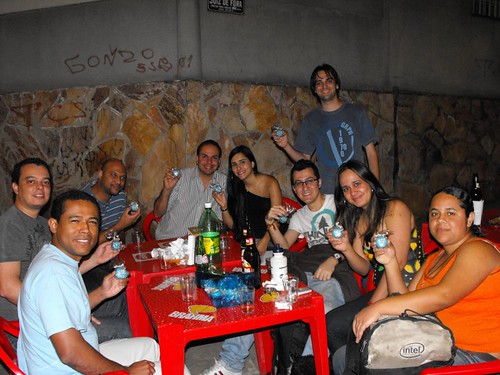
That is the English name of Belo Horizonte, the city where my fellows from KDE-MG group and I celebrated the 4.5 releases of KDE software. At the release party for 4.4 we tried to bring a cake, but it did not work out. This time Tulio, KDE-MG's member, made a surprise for us and brought some fashion, and taste, honey breads:


It was a pleasure night in Belo Horizonte, "Frango Frito" was crowed of people, I have never seen it that crowed before. Not all members of KDE-MG could attend the release party this time, well, they lost the honey breads hehe:


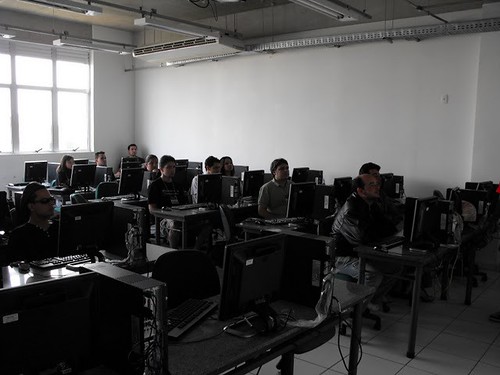
The release party was also a meeting to finish the details for the 3th Free Software Festival Belo Horizonte (FSLBH), which happened last Saturday in Betim, a city close to Belo Horizonte. This year we had help from the Betim Opensource guys to organise the FSLBH/Betim and to talk to the Pitagoras university to hold the event and hand over the computer classrooms for the mini-courses. Many thanks to them.

During the event we had lectures about free software and some mini-courses, including mine of Qt programming. I used the material created by Sandro and Tomaz from Liveblue, thanks to them.


We also distributed some gifts during the event:


The event last one day and it was for free. This time we asked the participants to bring toys to be distributed to a charity institution in Belo Horizonte:


FSLBH is becoming a recurrent event in Belo Horizonte, one the biggest cities in Brazil with several information technology universities. The KDE community is also increasing :-)

More pictures of the FSLBH, release parties and other events are available at the KDE-BR's flicker homepage.

Wednesday, August 18, 2010

Hotkey buttons and udev

As many notebooks out there mine has some hotkey buttons for (de)activate the wifi card, bluetooth controller, webcam, etc. With the buttons sometimes the notebook also has leds to indicate which hardware is activated at the moment, unfortunately my notebook only has leds for wifi and bluetooth, not for the webcam. More unfortunately yet the leds for wifi and bluetooth is the same led but with different color to indicate when only one of them are activated, but I must say Clevo, the manufacturer of my notebooks' barebone, did not make a good choice selecting the colors orange and green :-( It is very difficult to distinguish between the states wifi on / bluetooth off and wifi off / bluetooth on. Even the state wifi on / bluetooth on is not easy to notice. To minimize that problem I created some udev rules and some scripts to open a KDE notification dialog every time they are activated or deactivated. Everybody in Linux "world" must have heard of udev, the system daemon which receives events from the kernel and run programs or scripts based on rules storared in /etc/udev/rules.d or /lib/udev/rules.d. In my case I added my rules to /etc/udev/rules.d:
File /etc/udev/rules.d/50-lvs-rfkill.rules
SUBSYSTEM=="rfkill", RUN+="lvs-rfkill.sh"
File /etc/udev/rules.d/50-lvs-webcam.rules
# Change the idProduct and idVendor attributes to your camera's.
# Use lsusb to find them.
SUBSYSTEM=="video4linux", ATTRS{idProduct}=="0343", ATTRS{idVendor}=="5986", RUN+="lvs-webcam.sh"
Then run this to reload the rules:
Reload udev rules
udevadm control --reload-rules 
Now we need to create the scripts lvs-rfkill.sh and lvs-webcam.sh and give execution permission to them (chmod 755):
File /lib/udev/lvs-rfkill.sh
#!/bin/sh

find_display()
{
    if [ -r "/proc/$1/environ" ]
    then
        perl -ne 'if ( /DISPLAY=([^:]+){0,1}(:\d+)(.\d+){0,1}/ )
         { print "$1$2$3\n"; }' < /proc/$1/environ
    fi

    return 0
}

user_loop()
{
    OLD_DISPLAY=$DISPLAY
    ps -C kwrapper -C kwrapper4 h -o pid,user | while read pid user
    do
        grep -q ksmserver /proc/$pid/cmdline &> /dev/null || continue
        export DISPLAY=$(find_display $pid)
        su - $user -c "$1"
    done
    export DISPLAY=$OLD_DISPLAY
    unset OLD_DISPLAY
    sleep 1
}

title=
msg=
case $RFKILL_TYPE in
    wlan)
        title="Wireless"

        case $ACTION in
            add|change)
                case $RFKILL_STATE in
                    0)
                        msg="Wireless disabled"
                    ;;
                        
                    1)
                        msg="Wireless enabled"
                    ;;

                    2)
                        msg="Wireless disabled by hardware"
                    ;;
                esac
            ;;

            remove)
                msg="Wireless disabled"
            ;;
        esac
    ;;

    bluetooth)
        title="Bluetooth"

        case $ACTION in
            add)
                msg="Bluetooth enabled"
                echo 1 > /sys/$DEVPATH/state
            ;;

            remove)
                msg="Bluetooth disabled"
            ;;
        esac
    ;;
esac

if [ "$msg" != "" ]
then
    user_loop "$(ls /usr/kde/*/bin/kdialog | tail -n 1) \
        --title \"$title\" --passivepopup \"$msg\" 3"
fi
File /lib/udev/lvs-webcam.sh
#!/bin/sh

find_display()
{
    if [ -r "/proc/$1/environ" ]
    then
        perl -ne 'if ( /DISPLAY=([^:]+){0,1}(:\d+)(.\d+){0,1}/ )
            { print "$1$2$3\n"; }' < /proc/$1/environ
    fi

    return 0
}

user_loop()
{
    OLD_DISPLAY=$DISPLAY
    ps -C kwrapper -C kwrapper4 h -o pid,user | while read pid user
    do
        grep -q ksmserver /proc/$pid/cmdline &> /dev/null || continue
        export DISPLAY=$(find_display $pid)
        su - $user -c "$1"
    done
    export DISPLAY=$OLD_DISPLAY
    unset OLD_DISPLAY
    sleep 1
}

title="Webcam"
msg="Webcam"

case $ACTION in
    add)
        msg="$msg enabled"
    ;;

    remove)
        msg="$msg disabled"
    ;;
esac

user_loop "$(ls /usr/kde/*/bin/kdialog | tail -n 1) \
    --title \"$title\" --passivepopup \"$msg\" 3"
Now every time you turn wifi/bluetooth/webcam on/off a notification will appear near KDE's notification tray icon:

Wednesday, August 4, 2010

Samsung i8910: Interesting programs

Web


Symbian binaries

  • UC PLayer 2.2.2.10: finally a rmvb (and other formats) player that works.
  • I8910_R66.SISX: AKA Route66, GPS program that comes with i8910. It works good although many people seems to like Garmin and OviMaps better.
  • maps_installer_3.04_10wk11_b01_s60_5.0.Nocs.sis: maps takes less space than Route66 (190 MB vs 460 MB) and are easier to watch when zooming in and out.
  • TTPod s60v5 v3.71 (includes Portuguese version): good MP3 player, playlist support, sorting, lyrics and picture fetching, equalizer, skin support among other things.
  • Jbak.Taskman.v1.37: excelent task manager. This version is touch screen ready.
  • DataQuota.1.23.sisx
  • PNTools_S60v5_S603rd.sis: traceroute and ping utility.
  • PktPing.sis: ping utility.
  • uTalk: very good IM (Jabber, Gtalk, MSN, ICQ, Facebook, etc). Supports connecting to Jabber and GTalk at the same time. Unfortunately supports text message only, no VoIP or video conversation. It is supposed to support sending image and voice (as mp3 file), but it seems to do not work with non-utalk contacts, which comprises all my contacts. The location (GPS) feature also seems to work only with utalk contacts. I had to edit the 1.2.0 version .sis file using siscontents and remove the three files in !:/private/20025174/ directory to make the .sis file install. I copied the files to that directory after the installation.
  • fring94.sis: IM and VoIP client. I prefer to use the Nokia N97 version because it supports loudspeaker function, which the i8910 version does not. N97's fring does not let me input my fring id and password when using DayHand keyboard, so I had to disable DayHand (set AknFEP in the first option when opening DayHand app), enter the id and password and then reenable DayHand (set the other option in the first option when opening DayHand app).
  • talkonaut-s60.sisx (cliente jabber, GTalk, MSN, ICQ, Voip e SIP). Unfortunately it does not connect to Gtalk and Jabber at the same time, but uTalk does :-)
  • PhoNetInfo_v2.5.0.sis: shows complete phone information.
  • Nokia Connectivity Analyzer: handy program with lots of information about your Internet connection.
  • Mobile Info v0.2.0.sis: shows phone information.
  • Lock Screen 0.11.78.sisx: nice lock screen replacement. I needed to enable the keylock patch in ROMPatcher+ to make it to work properly.
  • DayHand_Input_by_Mr._Milk_19r4_unsigned.sis: nice virtual keyboard replacement. To make the % character available: copy the file C:/Data/dayhandinput/config/sym.ini to your computer, add the % symbol to the second line and copy the file back.
  • Mathiola Stopwatch: interesting stopwatch, supports laps and the time difference between the laps. OBS: Requires Qt libraries to run.
  • mConnection(005).sis: very simple (yet usefull) traffic monitor. When accessing the Internet it wil show two numbers at the screen's center top corner. The first is the amount of data transfered, the second is the current speed.
  • SisEditor.sisx: it is like a siscontents for Symbian, edits .sis files. Usually nobody needs to edit a .sis, I, for one, had to edit them in two ocasions only: to change the icons and colors in a S60v5 theme and to remove some files that prevent one program to install (I copied the files manually after instalation).
  • FinanzS60.sis: another finance (and scientifc) calculator. This is the one I use now.

Shareware or Commercial Programs
LCG.X-plore.v1.42.sisx: powerfull file manager.
Symsmb.v4.zip: implements SMB protocol in Symbian, in other words you can navigate on a Windows network (or Linux with Samba) and access directories or export a directory from i8910 to the network.
Smartphoneware.Best.Birthday.v2.0.S60v3.S60v5.SymbianOS9.x.Unsigned.sis: scans contact list and shows the anniversary for each contact. It can also add a reminder in the calender apps so a alarm will sound at the anniversary date. It also show the zodiac sign for each contact and can sort contacts by remain days to the anniversary.
MobiFunSoft.SmartSettings.v3.03: let change the first icon on Finger Use theme to a sub-menu with as many shorcuts as we want, very handy in my oppinion. There is other features too.
PhoneTorch 2.0.2: flash light (uses camera LED)
FinanzS60.sis: very good finance and scientific calculator.

Games
meteorbeta_nokia5800_01.sis: this one is fun, but takes a lot of battery joice.
solitaire_s60_5_0_v_1_1_0_selfs.sis: Solitaire :-)
Offscreen Freecell.sis: Freecell :-)
Offscreen_Checkers_touch.sis: Checkers :-)
touchpiano_s60_5_0_v_1_0_0_signed.sis: to play piano with i8910. Well, it has only octave and there are a lot of lag between pressing the key and the actual sound, so it is not that fun :-/
mirror.sis: activate the front camera.

Flash
QuickInfo.wgz: shows several information about the phone.
FlashLight v7 FINAL By Azzam Mouawad.rar: flash light (does not use LED camera)
appuidlist.wgz: shows Symbian app uids, QuickInfo also list apps uids and Jbak Taskman show app uid for a given process.

Java
SoftTouchStopWatch.zip: very good stop watch, supports laps.
Unite.Bank.Finance.Calc.v1.00.S60.Java.rar: finance calculator
ScratchPad.zip: blackboard
anyRemote-48b.jar: client program to control a Linux computer from i8910 using bluetooth

Python
s60_as_bt_gps.py: program to transform i8910 into a bluetooth GPS. You can import GPS data in real-time into GoogleEarth too.
Birthdays-for-S60: program similar to Best Birthdays, it is free software, although this one lacks many Best Birthdays features.

Saturday, July 31, 2010

Plasma NM, modem Sony MD300 and more...

During the time I implemented ModemManager support in Solid I did the tests with my Sony MD300 modem. For anyone to use this modem in Linux do this as root (or use sudo):

  1. Install networkmanager-0.8 and modemmanager-0.4;
  2. Create the file /etc/udev/rules.d/50-md300modem.rules with the follwing contents:


    1. ACTION!="add", GOTO="3G_End"
    2. SUBSYSTEM=="usb_device", ATTRS{idProduct}=="d0cf", ATTRS{idVendor}=="0fce", PROGRAM+="md300modem.sh %p"
    3. SUBSYSTEM=="usb", ATTRS{idProduct}=="d0cf", ATTRS{idVendor}=="0fce", KERNEL=="ttyACM*", SYMLINK+="modem3G-%n"
    4. LABEL="3G_End"
    
  3. Create the script /lib/udev/md300modem.sh with the following contents:


    1. #!/bin/sh
    2. echo 3 > /sys/$1/device/bConfigurationValue
    3. sleep 3
    4. # enables/activates the modem (turns radio on and registers to operator network).
    5. chat -V -s '' "AT +CFUN=1" 'OK' '' < /dev/ttyACM0 > /dev/ttyACM0
  4. Run: udevadm control --reload-rules;
  5. Click on Plasma NM's system tray icon -> Manage Connections -> Mobile broadband  -> Add -> GSM Connection and use the parameters:


    Number: *99#
    Username: <operator's username>
    Senha: <operator's password>
    APN: <operator's apn>
    Type: Any
    For instance my configuration is as follow:
    Number: *99#
    Nome do usuário: tim
    Senha: tim
    APN: tim.br
    Type: Any
    
    OBS: some cell phones, like my Samsung i8910, only connects if "Type" is set to "Any". The MD300 connects with any of the types listed.
  6. Hook up the modem to the USB port, wait until it powers up and register itself to the operator network (takes about 30 seconds to do both);
  7. In the Plasma NM initial window clicks on the connection you have created.
My modem connects only once in ethernet mode (default mode), to connect again I have to remove it from USB port and hook it up again. I do not know why that happens and one guy told me his MD300 does not behave like that. Oddly enough with wvdial and kppp, which uses ppp mode, it does have this problem.

To make it easier to set up a Mobile Broadband connection I have started to port the nm-applet connection wizard to KDE. It is still in early stage and I am working on it only during weekends. Probably it will be ready for KDE release 4.6 early next year. The initial window is like this:


It takes some time to understand how both nm-applet wizard and Plasma NM kcm modue work and since I can only work on it during weekends do not expected something usefull until September.

Wednesday, July 14, 2010

Plasma NM: testing mode

I am back to Brasil after a great time in Tampere and Helsinki. During Akademy I commited my changes to Solid and Plasma NetworkManagement to trunk, now anyone brave anough to use trunk can try them :-)

Today I have added a hack to Plasma NM to make the traffic graph work with ppp connections. The problem was that NetworkManager only provides the serial device name (e.g. /dev/ttyACM0 or /dev/ttyUSB0) and Plasma::DataEngine expects the network interface name (ppp0) used by the device. I hacked Plasma NM by changing the Plasma::DataEngine::connectSource parameter to always use ppp0 when the interface name contains ttyACM or ttyUSB. I know that is ugly and error prone, if anyone knows how to convert serial device names to network interface names let me know. The only way to do it I have found so far is monitoring /var/log/daemon (or /var/log/messages) for the line pppd[]: Connect: ppp0 <--> /dev/ttyACM0, but that is also ugly and the log file containing the needed information can be different on each platform KDE SC is installed.

I have also tested Plasma NM with my Samsung i8910 cell phone. It only connects if I set Plasma NM's tray icon -> Manage Connections -> Mobile Broadband -> -> Edit -> Type to "Any" (it was "Prefer3G" before the change). Maybe someone else also needs to change that to make his/her phone connect. The number to dial also needs to be *99# instead of *99***1# . That is strange because my Sony MD300 modem works with *99***1# and as far as I know *99# is a short name for *99***1#.

Modem Manager does not report the access technology (Edge, HSDPA, etc) for my cell phone. I have received the report that Nokia N95 also connects and MM also does not report the access technology for that phone too.

There are other changes I am working on, when they are ready I will let you know :-)