Search This Blog

Saturday, January 29, 2011

Symbian Modding 2

I have installed HX-V11 firmware on my phone and like most of it. One thing that I did not like was the theme used by Orange Tsunami homescreen, so I decided to change it a bit using siscontents. This is the result:


Maybe I will change the bottom bar's icons, for now it is almost as I would like it. If you wanna try it the installation file is here. Remove the _.txt file extension before copying it to the phone.

Update: now it is better :-)

Update 2: Tsunami + Widgetizer

Update 3


Friday, January 21, 2011

Samsung i8910 cellphone and Linux


Synchronizing contacts in the command line

  • Install program syncml-ds-tool. In my case it comes in the libsyncml-0.5.2 ebuild (package in Gentoo's jargon).
  • Create an empty directory called contacts.
  • Connect the i8910 to the USB port in "PC Suite" mode.
  • Execute the script below:

    File sync_contacts.sh
    #!/bin/sh
    syncml-ds-tool -u 0 --identifier 'PC Suite' --version 1.1 --wbxml \
    --username '' --password '' --useStringTable --remoteWinsConflicts \
    --slow-sync text/x-vcard Contacts $(pwd)/contacts/
    

One file per contact will be created in the contacts directory. They are in vCard 2.1 format, you can edit them with your prefered text editor. To upload the changes to the phone:

  • Delete all contacts from you phone (yes, that is right). To delete them go to Contacts -> Options -> Mark/Unmark -> Mark all, then Options -> Delete.
  • Execute the same script above.

One alternative to deleting all phone's contacts is removing the "--remoteWinsConflicts" option and executing the script above. I prefer to use the first method because sometimes removing "--remoteWinsConflicts" makes contacts appear twice in the phone or in the contacts directory.

You can use KDE's KAddressbook to edit the contacts. When I have more time I will write how to do that.

Synchronizing contacts using KDE's Akonadi
Well, this is yet to be written since it is not officially working. There is an old version that works somewhat, but is not reliable so we have better wait.

Using the phone as bluetooth modem
If you use Linux and KDE follow the instructions in here, if not keep reading :-)

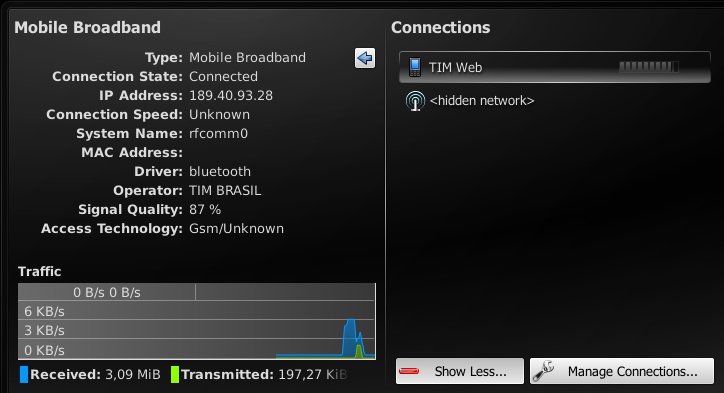
Ok, now it connects and I can surf the web, I am connected through bluetooth now. What I did:

udev/bluethood do not create the /dev/rfcommX, I had to create it and connect it manually to my phone:

#mknod --mode=666 /dev/rfcomm0 c 216 0
#rfcomm connect 0 <phone's mac address> 4

The number 0 in the rfcomm command means rfcomm0. The number 4 is the channel. To find the correct channel do:

evolucao ~ # sdptool search DUN
Inquiring ...
Searching for DUN on 00:23:D4:2E:13:B8 ...
Service Name: Dial-Up Networking
Service RecHandle: 0x1001f
Service Class ID List:
  "Dialup Networking" (0x1103)
Protocol Descriptor List:
  "L2CAP" (0x0100)
  "RFCOMM" (0x0003)
    Channel: 4
Language Base Attr List:
  code_ISO639: 0x454e
  encoding:    0x6a
  base_offset: 0x100
Profile Descriptor List:
  "Dialup Networking" (0x1103)
    Version: 0x0100

DUN means bluetooth dial-up network.

then you can use wvdial: using /dev/rfcomm0 as Modem parameter.

It also works with KDE's Plasma NetworkManagement and ModemManager-0.4:


Using the phone as Bluetooth GPS

To do that you need:

. python and python script shell 2.0.0 signed by Nokia with full capability. Most python install files out there do not have Location capability, which rises "permission denied" errors when any python program tries to access the internal GPS. Probably this also happens with Java programs, which would affect ExtGPS. The needed files are Python_2.0.0.sis and PythonScriptShell_2.0.0_high_capas.sis. Install them on C:

. download s60_as_bt_gps.py and locationrequestor_3rd.sis. I had to add some fixes to s60_as_bt_gps.py to prevent it from crashing. The changes are simple: 1. In line 34 change "import socket" to "import btsocket as socket"; 2. In line 320 add a "if len(args) > 7:", in the following 5 lines add a tab to ident the if (Python requires that to accept the if); 3. In line 332 do the same, add "if len(args) > 13:" and ident all lines until the line with "###########"

. Install the .sis and copy s60_as_bt_gps.py to C:/Data/Python/ using X-plore for instance.

. turn Bluetooth on.

. run Python Scriptshell and from there run s60_as_bt_gps.py.

. click on Options -> Accept Connections.

That is it. The bluetooth service should be available now on channel 10.

Importing GPS data into GoogleEarth
I also managed to import the data into GoogleEarth running in my Linux installation. I have not tried to do that in Windows. I used the information here, although I had to fix the python script available in that page (gegpsd-0.2.py) because the script in the phone exports the GPS data in a different NMEA type. It is not that hard to fix it, you just need to understand the fields in the two NMEA types used by the phone ($GPGGA) and the script ($GPRMC).

To attach the phone's bluetooth NMEA service to Linux you need to execute as root:

rfcomm bind /dev/rfcomm0  00:11:22:33:44:55 10

where 00:11:22:33:44:55 is your phone's bluetooth MAC address and 10 is the channel the 60_as_bt_gps.py script got from Symbian bluetooth service (it may not be 10).

Then you need to edit the gegpsd-0.2.py file and change the serial_port variable to /dev/rfcomm0, the field number 3 to 2 (latitude), 5 to 4 (longitude), 4 to 3 (North/South switch), and 6 to 5 (West/East switch) in the datablock variable, and change $GPRMC to $GPGGA. The $GPGGA type does not indicate speed so you can ignore this value.

Then is just run the gegpsd-0.2.py script and import the gps.kml file available on that page into GoogleEarth. It is a bit slow but it works :-)

Thursday, November 18, 2010

Back to work

After ENSL and Latinoware I am back to work... or kind of, I am going to talk to my current employer tomorrow to decide my future in the company. In the meantime I have fixed one bug in the Mobile Connection Wizard (MCW) which Anselmo, from INdT (Nokia Technology Institute) told me during ENSL conference two weeks ago. Now if MCW finds something wrong opening or parsing the two files it needs to work it will fallback to the old manual configuration dialog. The two mentioned files are /usr/share/zoneinfo/iso3166.tab and /usr/share/mobile-broadband-provider-info/serviceproviders.xml.

Yesterday I tried (again) to fix one crash in Plasma NM when NetworkManager restarts. It seems to work now and without the side effects that forced me to undo the changes last month. I am going to do some more tests and commit the changes later on.

I did not posted about Latinoware's second and third days but I must say they were great :-) really fun, no rain during all event (last year it rained a lot in some days), I could visit Paraguay at last, I gave my DBUs mini-course lecture, it was like a private lesson as only one person appeared :-). Unfortunately I could not solve Camila's netbook wifi card problem. In the end I recompiled the kernel, which took more about 10 hours (!) in her netbook and the driver complained it does not recognise the wifi card. The problem is just that: there is no (100%) opensource driver for that wifi card, there are some binary drivers (3dsp.ko) but not for Arch Linux kernel, so I tried to recompile this old driver I found in the manufacturer web site. After a couple of changes I had to do in the driver's source code it compiled but not worked. Even ndiswrapper crashes when loading the Windows driver, so no go for now. The last options are changing from Arch Linux to one of the "supported" distributions or buy another card.

Wednesday, November 10, 2010

Latinoware: first day

This is my second apperance in Latinoware and the first as a lecturer. Last year I spent most of the time at the KDE both, today I also spent a lot of time at the booth talking to visitors and fixing some problems in Camila's netbook (date/time configuration and wifi driver not working), but tomorrow I am going to visity Paraguay. For those who do not knows Paraguay is one of the three countries in this region, Argentina and Brazil are the other two, the countries are splitted only by two rivers. Ciudad del Leste in Paraguay is famous among Brazilians for its electronic shops :-)

Ok, let's stop talking about Paraguay. This first day we had all KDE lectures, tomorrow we are going to have Sandro's mini-course (Desktop and Mobile Developing with Qt 4.7) and in the (almost) last event of the last day my mini-course about programming with DBus (next Friday).


As usual we have all three event's offical languages

I took most of today's photos using Camila's camera, so I do not have the event's photos with me right now.

After some delay the event started with Tomaz Canabrava's lecture, "Programming with Efficiency: Two Games in 40 minutes". In the afternoon we had Adriano's ("Developing Rich Interface Qt Applications for Mobile") and Camila's lectures ("KDE Needs You: Paths to Start Contributing"). Ronny Yabar from Peru could not present his lecture "3D Developing with Qt and KDE" as far as I know because he became sick and was not able to take his flight to come here. Jos Poortvliet is going to present his lecture ("Why are you at Latinoware") tomorrow.

As the last event for this first day we had a confraternization with live music played by a local band.

More news tomorrow :-)

Monday, November 8, 2010

Back from Natal

I am back from the IV Northeast Free Software Meeting (ENSL in Portuguese), which took place in Natal city. Photos, photos :-) Tomorrow I fly to Foz do Iguaçu to attend Latinoware. ENSL is the second edition of the III KDE Brazil Forum, the first one was in FISL, the next one is going to be during Latinoware, where KDE Brazil members will present lectures and mini-courses about Qt/KDE community and technologies.

First day, each of us gave our depoiments on how we first heard of KDE and why we like KDE community and software :-)

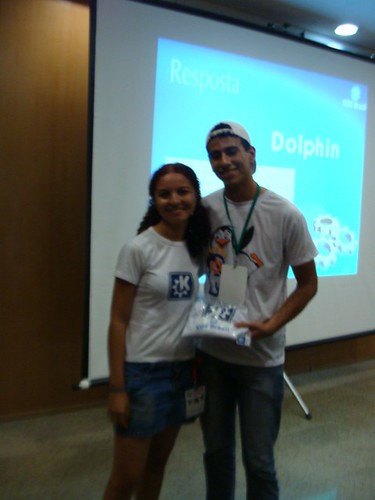
During the event we had the idea of making a KDE quiz to know who really learned something from our lectures. Who answered the question correctly won a KDE kit (t-shirt and two stickers). There were also some really funny answers hehe. 

Many people in the event have heard of KDE before but did not know exactly what KDE really is, so the quiz was a great idea to receive feedback from the audience about our lectures and to have some fun :-)

Wednesday, November 3, 2010

Traveling in November

The IV (Brazilian) Northeast Free Software Meeting (ENSL in Portuguese) is going to start next Friday and I am going to Natal city to attend it :-) That is going to be my first visit to Natal, which is +/- close to Recife, where I spent eight days early this year. I like northeast beaches because of the warm sea water. You just really need to use sun protector in the North, the sun there is noticeable stronger than here in the middle of Brazil.

After ENSL I am going to to Belo Horizonte and two days later I going to Foz do Iguaçu for Latinoware, the second biggest Brazilian free software conference, in the triple border between Argentina, Brazil and Paraguay. In both conferences I am going to present a DBus programming mini-curse. Actually I am in a hurry these days to finish the last presentation details. We are going to have the III KDE Brazil Forum inside both ENSL and Latinoware, so if somebody is visiting (or live near) Natal or Foz do Iguaçu go there to see us.

Wednesday, October 6, 2010

Plasma NM: Mobile Connection Wizard commited


Last night I commited the Mobile Connection Wizard patch, now Plasma NM can configure 3G connections (GSM and CDMA) easily. You can test the changes by checking out trunk Plasma NM (revision r1182930 at least) or waiting until distributions create unstable packages with the changes. In Gentoo you can try it out using knetworkmanager-9999 ebuild in kde overlay:
layman -a kde # or -s kde if you already added it
# edit /etc/make.conf to add layman's configuration
echo "kde-misc/knetworkmanager **" >> /etc/portage/package.keywords
emerge -v =knetworkmanager-9999
With other distributions you need to checkout trunk Plasma NM or wait for the compiled package to appears in the repositories for unstable packages:

svn checkout svn+ssh://svn.kde.org/home/kde/trunk/extragear/base/networkmanagement

I tried to fix as most bugs as possible during Solid Sprint, there are still some minor things I want to change in the code, but I think it is ready for production. So have fun with it. Bugs can be reported through bugs.kde.org. I tested the code using KDE SC 4.5.1 and is very likely that it also works with 4.4.x. The only dependency I added is Qt-xml for parsing the mobile-broadband-provider-info file. The screenshots are the same as in the last post I wrote about it.