Search This Blog

Showing posts with label samsung i8910 symbian. Show all posts

Saturday, January 29, 2011

Symbian Modding 2

I have installed HX-V11 firmware on my phone and like most of it. One thing that I did not like was the theme used by Orange Tsunami homescreen, so I decided to change it a bit using siscontents. This is the result:


Maybe I will change the bottom bar's icons, for now it is almost as I would like it. If you wanna try it the installation file is here. Remove the _.txt file extension before copying it to the phone.

Update: now it is better :-)

Update 2: Tsunami + Widgetizer

Update 3


Friday, January 21, 2011

Samsung i8910 cellphone and Linux


Synchronizing contacts in the command line

  • Install program syncml-ds-tool. In my case it comes in the libsyncml-0.5.2 ebuild (package in Gentoo's jargon).
  • Create an empty directory called contacts.
  • Connect the i8910 to the USB port in "PC Suite" mode.
  • Execute the script below:

    File sync_contacts.sh
    #!/bin/sh
    syncml-ds-tool -u 0 --identifier 'PC Suite' --version 1.1 --wbxml \
    --username '' --password '' --useStringTable --remoteWinsConflicts \
    --slow-sync text/x-vcard Contacts $(pwd)/contacts/
    

One file per contact will be created in the contacts directory. They are in vCard 2.1 format, you can edit them with your prefered text editor. To upload the changes to the phone:

  • Delete all contacts from you phone (yes, that is right). To delete them go to Contacts -> Options -> Mark/Unmark -> Mark all, then Options -> Delete.
  • Execute the same script above.

One alternative to deleting all phone's contacts is removing the "--remoteWinsConflicts" option and executing the script above. I prefer to use the first method because sometimes removing "--remoteWinsConflicts" makes contacts appear twice in the phone or in the contacts directory.

You can use KDE's KAddressbook to edit the contacts. When I have more time I will write how to do that.

Synchronizing contacts using KDE's Akonadi
Well, this is yet to be written since it is not officially working. There is an old version that works somewhat, but is not reliable so we have better wait.

Using the phone as bluetooth modem
If you use Linux and KDE follow the instructions in here, if not keep reading :-)

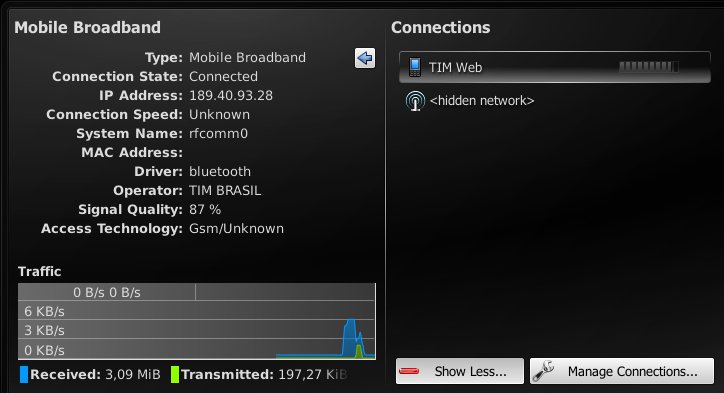
Ok, now it connects and I can surf the web, I am connected through bluetooth now. What I did:

udev/bluethood do not create the /dev/rfcommX, I had to create it and connect it manually to my phone:

#mknod --mode=666 /dev/rfcomm0 c 216 0
#rfcomm connect 0 <phone's mac address> 4

The number 0 in the rfcomm command means rfcomm0. The number 4 is the channel. To find the correct channel do:

evolucao ~ # sdptool search DUN
Inquiring ...
Searching for DUN on 00:23:D4:2E:13:B8 ...
Service Name: Dial-Up Networking
Service RecHandle: 0x1001f
Service Class ID List:
  "Dialup Networking" (0x1103)
Protocol Descriptor List:
  "L2CAP" (0x0100)
  "RFCOMM" (0x0003)
    Channel: 4
Language Base Attr List:
  code_ISO639: 0x454e
  encoding:    0x6a
  base_offset: 0x100
Profile Descriptor List:
  "Dialup Networking" (0x1103)
    Version: 0x0100

DUN means bluetooth dial-up network.

then you can use wvdial: using /dev/rfcomm0 as Modem parameter.

It also works with KDE's Plasma NetworkManagement and ModemManager-0.4:


Using the phone as Bluetooth GPS

To do that you need:

. python and python script shell 2.0.0 signed by Nokia with full capability. Most python install files out there do not have Location capability, which rises "permission denied" errors when any python program tries to access the internal GPS. Probably this also happens with Java programs, which would affect ExtGPS. The needed files are Python_2.0.0.sis and PythonScriptShell_2.0.0_high_capas.sis. Install them on C:

. download s60_as_bt_gps.py and locationrequestor_3rd.sis. I had to add some fixes to s60_as_bt_gps.py to prevent it from crashing. The changes are simple: 1. In line 34 change "import socket" to "import btsocket as socket"; 2. In line 320 add a "if len(args) > 7:", in the following 5 lines add a tab to ident the if (Python requires that to accept the if); 3. In line 332 do the same, add "if len(args) > 13:" and ident all lines until the line with "###########"

. Install the .sis and copy s60_as_bt_gps.py to C:/Data/Python/ using X-plore for instance.

. turn Bluetooth on.

. run Python Scriptshell and from there run s60_as_bt_gps.py.

. click on Options -> Accept Connections.

That is it. The bluetooth service should be available now on channel 10.

Importing GPS data into GoogleEarth
I also managed to import the data into GoogleEarth running in my Linux installation. I have not tried to do that in Windows. I used the information here, although I had to fix the python script available in that page (gegpsd-0.2.py) because the script in the phone exports the GPS data in a different NMEA type. It is not that hard to fix it, you just need to understand the fields in the two NMEA types used by the phone ($GPGGA) and the script ($GPRMC).

To attach the phone's bluetooth NMEA service to Linux you need to execute as root:

rfcomm bind /dev/rfcomm0  00:11:22:33:44:55 10

where 00:11:22:33:44:55 is your phone's bluetooth MAC address and 10 is the channel the 60_as_bt_gps.py script got from Symbian bluetooth service (it may not be 10).

Then you need to edit the gegpsd-0.2.py file and change the serial_port variable to /dev/rfcomm0, the field number 3 to 2 (latitude), 5 to 4 (longitude), 4 to 3 (North/South switch), and 6 to 5 (West/East switch) in the datablock variable, and change $GPRMC to $GPGGA. The $GPGGA type does not indicate speed so you can ignore this value.

Then is just run the gegpsd-0.2.py script and import the gps.kml file available on that page into GoogleEarth. It is a bit slow but it works :-)

Thursday, September 9, 2010

Symbian Modding

This week I changed my i8910's firmware from HX to n2o4. n2o4 has very fast kastor effects so I like it at first, but I do not like some other things: the theme is too "yellow" to my taste and I like the icon's white border in the original Nero II theme, which I use with HX. The problem is that I also like to listen to radio but Nero II (and all other Morkino's theme I have used so far) has a problem that radio frequency does not appear. Yesterday I tried to solve this problem and finally I got success :-). What I did is:


  1. Install siscontents160b
  2. Open Nero_II_HD_.sis
  3. Click on the icon "Contents"
  4. Select the file "themepackage.skn" in the contents
  5. Click on View details
  6. Then on "Colours" tab
  7. Then on "Add colour groups" and select "Samsung Text Colours". You can keep the default colours or change it for your taste
  8. Click on "Close"
  9. Click on "File" menu entry, then "Save as..."
  10. Install the fixed theme :-)


I have also changed the homescreen toolbar icons to fit Nero II using these steps. This is the result:


Pra quem estiver interessado fiz upload do arquivo "Message 1.aac" que uso como tom para chegada de mensagens.

Wednesday, August 4, 2010

Samsung i8910: Interesting programs

Web


Symbian binaries

  • UC PLayer 2.2.2.10: finally a rmvb (and other formats) player that works.
  • I8910_R66.SISX: AKA Route66, GPS program that comes with i8910. It works good although many people seems to like Garmin and OviMaps better.
  • maps_installer_3.04_10wk11_b01_s60_5.0.Nocs.sis: maps takes less space than Route66 (190 MB vs 460 MB) and are easier to watch when zooming in and out.
  • TTPod s60v5 v3.71 (includes Portuguese version): good MP3 player, playlist support, sorting, lyrics and picture fetching, equalizer, skin support among other things.
  • Jbak.Taskman.v1.37: excelent task manager. This version is touch screen ready.
  • DataQuota.1.23.sisx
  • PNTools_S60v5_S603rd.sis: traceroute and ping utility.
  • PktPing.sis: ping utility.
  • uTalk: very good IM (Jabber, Gtalk, MSN, ICQ, Facebook, etc). Supports connecting to Jabber and GTalk at the same time. Unfortunately supports text message only, no VoIP or video conversation. It is supposed to support sending image and voice (as mp3 file), but it seems to do not work with non-utalk contacts, which comprises all my contacts. The location (GPS) feature also seems to work only with utalk contacts. I had to edit the 1.2.0 version .sis file using siscontents and remove the three files in !:/private/20025174/ directory to make the .sis file install. I copied the files to that directory after the installation.
  • fring94.sis: IM and VoIP client. I prefer to use the Nokia N97 version because it supports loudspeaker function, which the i8910 version does not. N97's fring does not let me input my fring id and password when using DayHand keyboard, so I had to disable DayHand (set AknFEP in the first option when opening DayHand app), enter the id and password and then reenable DayHand (set the other option in the first option when opening DayHand app).
  • talkonaut-s60.sisx (cliente jabber, GTalk, MSN, ICQ, Voip e SIP). Unfortunately it does not connect to Gtalk and Jabber at the same time, but uTalk does :-)
  • PhoNetInfo_v2.5.0.sis: shows complete phone information.
  • Nokia Connectivity Analyzer: handy program with lots of information about your Internet connection.
  • Mobile Info v0.2.0.sis: shows phone information.
  • Lock Screen 0.11.78.sisx: nice lock screen replacement. I needed to enable the keylock patch in ROMPatcher+ to make it to work properly.
  • DayHand_Input_by_Mr._Milk_19r4_unsigned.sis: nice virtual keyboard replacement. To make the % character available: copy the file C:/Data/dayhandinput/config/sym.ini to your computer, add the % symbol to the second line and copy the file back.
  • Mathiola Stopwatch: interesting stopwatch, supports laps and the time difference between the laps. OBS: Requires Qt libraries to run.
  • mConnection(005).sis: very simple (yet usefull) traffic monitor. When accessing the Internet it wil show two numbers at the screen's center top corner. The first is the amount of data transfered, the second is the current speed.
  • SisEditor.sisx: it is like a siscontents for Symbian, edits .sis files. Usually nobody needs to edit a .sis, I, for one, had to edit them in two ocasions only: to change the icons and colors in a S60v5 theme and to remove some files that prevent one program to install (I copied the files manually after instalation).
  • FinanzS60.sis: another finance (and scientifc) calculator. This is the one I use now.

Shareware or Commercial Programs
LCG.X-plore.v1.42.sisx: powerfull file manager.
Symsmb.v4.zip: implements SMB protocol in Symbian, in other words you can navigate on a Windows network (or Linux with Samba) and access directories or export a directory from i8910 to the network.
Smartphoneware.Best.Birthday.v2.0.S60v3.S60v5.SymbianOS9.x.Unsigned.sis: scans contact list and shows the anniversary for each contact. It can also add a reminder in the calender apps so a alarm will sound at the anniversary date. It also show the zodiac sign for each contact and can sort contacts by remain days to the anniversary.
MobiFunSoft.SmartSettings.v3.03: let change the first icon on Finger Use theme to a sub-menu with as many shorcuts as we want, very handy in my oppinion. There is other features too.
PhoneTorch 2.0.2: flash light (uses camera LED)
FinanzS60.sis: very good finance and scientific calculator.

Games
meteorbeta_nokia5800_01.sis: this one is fun, but takes a lot of battery joice.
solitaire_s60_5_0_v_1_1_0_selfs.sis: Solitaire :-)
Offscreen Freecell.sis: Freecell :-)
Offscreen_Checkers_touch.sis: Checkers :-)
touchpiano_s60_5_0_v_1_0_0_signed.sis: to play piano with i8910. Well, it has only octave and there are a lot of lag between pressing the key and the actual sound, so it is not that fun :-/
mirror.sis: activate the front camera.

Flash
QuickInfo.wgz: shows several information about the phone.
FlashLight v7 FINAL By Azzam Mouawad.rar: flash light (does not use LED camera)
appuidlist.wgz: shows Symbian app uids, QuickInfo also list apps uids and Jbak Taskman show app uid for a given process.

Java
SoftTouchStopWatch.zip: very good stop watch, supports laps.
Unite.Bank.Finance.Calc.v1.00.S60.Java.rar: finance calculator
ScratchPad.zip: blackboard
anyRemote-48b.jar: client program to control a Linux computer from i8910 using bluetooth

Python
s60_as_bt_gps.py: program to transform i8910 into a bluetooth GPS. You can import GPS data in real-time into GoogleEarth too.
Birthdays-for-S60: program similar to Best Birthdays, it is free software, although this one lacks many Best Birthdays features.

Friday, March 12, 2010

Samsung i8910: HX2.11 firmware

New firmware released, there are a lot of minor changes compared to 2.02 and some big changes:

1. One of the big changes is that now the .exe formats C: and E: so you have to make a backup begore flashing it.

2. Switching from portraid to landscape is faster now.

3. Increase in heap memory, cache entries, CPU time, app framerate and other things. All that should make phone faster, we just do not know yet if that affects battery time.

4. There is a modem update too (ModemJB1.rar). Updating modem is not mandatory, but I usually do it, the order of upgraing (modem before firmware or vice-verse) does not matter.

Now the problems and warnings:

1. 3D Navigation vs changing profile in Finger Use home screen theme: in Finger Use theme you can change the profile by clicking on the date in home screen, after that you just need to click on the profile name, but if if 3D Navigation is enabled you have to press the profile name for a couple of seconds. 3D Navigation is enabled by default, you can disable it in menu -> Settings -> Personal -> Home screen -> 3D Navigation -> Disable.

2. After flashing the firmware the phone has problems to read files from E:. To solve the problem go to the file manager (menu -> Office -> File mgr.) and click on the E: drive.

3. As in all HyperX firmwares the Music Player only search for .mp3 in C:/Music and F:/Music.

4. Some people has problem with camera image sparkling under white flourescent light. It seem related to power line frequency (HX2.11 JB1 is said to have this problem in countries that use 50 Hz in their power lines).

Future modifications:

. Andy (HyperX) made some changes to improve framerate on HD video recording (1280x720i), it seems now the phone is capable of recording in constant 23.75 fps framerate.

=====
Novo firmware lançado, há uma série de pequenas alterações em comparação com a HX 2.02 e algumas grandes mudanças:

1. Uma das grandes mudanças é que agora o .exe format os drives C: e E:, então você tem que fazer um backup antes the instalar o firmware.

2. Mudar a tela de retrato para paisagem é mais rápido agora.

3. Aumento de memória heap, entradas de cache, tempo de CPU, taxa de atualização dos aplicativos dentre outras coisas. Tudo isso deve fazer do aparelho mais rápido, só não sabemos ainda se isso afeta o tempo de bateria.

4. Há uma atualização do modem também (ModemJB1.rar). A atualização do modem não é obrigatória, mas eu costumo fazê-la. A ordem de atualização (modem antes de firmware ou vice-verso) não importa.

Agora, os problemas e as advertências:

1. Navegação 3D vs mudança de perfil no tema Finger Use na tela inicial: no tema Finger Use você pode alterar o perfil clicando na data da tela inicial, depois que você só precisa clicar no nome do perfil, mas se a Navegação 3D está habilitada você tem que apertar o nome do perfil por alguns segundos. A Navegação 3D é ativada por padrão, você pode desabilitá-lo no menu -> Configurações -> Pessoal -> Tela inicial -> Navegação 3D -> Desativar.

2. Depois de atualizar o firmware, o aparelho tem problemas para ler arquivos do E:. Para resolver o problema vá no gerenciador de arquivos (Menu -> Office -> Gerenciador arquivo) e clique na unidade E:.

3. Como em todos os firmwares HyperX o tocador de música pesquisa mp3 somente no C:/Music e F:/Music.

4. Algumas pessoas tem problemas com a imagem da câmera cintilando sob luz fluorescente branca. Isso parece relacionado à freqüência de alimentação da tomada (HX2.11 JB1 parece ter esse problema em países que usam 50 Hz nas tomadas).

Futuras modificações:

. Andy (HyperX) fez algumas mudanças para melhorar a taxa de atualização nas gravações de vídeo HD (1280x720i), parece que agora o aparelho é capaz de gravar vídeo a uma taxa constante de 23,75 quadros por segundo.

Sunday, February 7, 2010

Samsung i8910: HX2.02 firmware

Today I have upgraded my Samsung i8910 cell phone's firmware to HX2.02 (an alternative firmware "cooked" by HyperX). The new Nero II HD theme is very slick and this firmware makes things look faster than the previous one (HX1.31_speed). The only two regressions are the fact that I cannot scroll Smartsettings' shortcuts anymore, so I can only see the first nine shortcuts. The second regression is the shortcut button in LBS Navigation that closes the application instead of showing the shortcuts. I already knew that would happen by what I read in Hyper's web site, but I wanted to have the Dictionary application back, that is a proprietary payed application that was removed in HX1.31_speed. Now I have it back and working :-)

Hoje eu atualizei o firmware do my celular Samsung i8910 para a versão HX2.02 (um firmware alternativo "cozinhado" pelo HyperX). O novo tema Nero II HD é muito ajeitado e este firmware faz as coisas parecerem mais rápidas do que na versão anterior (HX1.31_speed). As duas únicas regressões são o fato de não poder rolar os atalhos do Smartsettings, por isso só consigo ver os primeiros nove atalhos. A segunda regressão é o botão de atalho do LBS Navigation que fecha a applicação ao invés de mostrar os atalhos. Eu sabia que isso iria acontecer pelo que li no site do HyperX, mas eu queria a aplicação de dicionário de volta, esta é uma aplicação proprietária paga que foi removida da HX1.31_speed. Agora eu a tenho de volta e funcionando :-)