When I got the idea to implement system connections I thought in just fixing a bug, but since NetworkManager is changing its API and ABI during the 0.8 to 0.9 transition the challenge has increased.
The main change from 0.8 to 0.9 specification is that now all connections are system wide with new DBus interfaces for the clients (Plasma NM for instance) to provide secrets (user name, password, encrpyt keys) to NetworkManager. Most of the changes are there to shrink NM's clients (Plasma NM, nm-applet, cnetworkmanager) source code, so it seems to be good change. We will need to change Solid's NM backend to meet the new specificaton, which can be problematic for distributions because they will only be available in KDE SC 4.7, scheduled to be released in late July.
Talking about distributions, one Fedora guy showed up in kde-networkmanagement mailinglist. NM-0.9 is going to be released next week and Fedora guys are thinking in using NM-0.9 in F15, preferably with a working Plasma NM. To do so would require changes in KDE SC 4.6x API used in F15, something that KDE tries really hard to avoid.
One good news is that a guy from Pardus Linux (Gökçen Eraslan) have been working in implementing system connections since last year, I just forgot about that hehe, sorry. So we already have a working implementation but Gökçen Eraslan still have not answered my e-mail about his implemenation. If it is working good with no side-effects we can add it to networkmanagement master repository and starting from there to meet NM 0.9 specification from Plasma NM's point of view. The Solid's NM backend part will need more discussing about how to proceed.

Blog about Linux and KDE.
Thursday, March 10, 2011


Monday, March 7, 2011
Plasma NM: big feature
Now that I have commited the read/save plasmoid state patch it is time to implement a big feature. Before that I must say that there is a bug in Solid's NetworkManager backend, it does not emit the wirelessHardwareEnabledChanged signal. Without that signal the "Enable wireless" checkbox does not work as expected, sometimes it gets disabled (read-only), so I suggest that distribution packagers apply this one line patch to fix the problem. The patch will be available in KDE SC 4.6.2.
Turning the big feature, nothing better to implement than the most hated Plasma NM bug: knetworkmanager does not show system connections. I spend last Sunday trying to understand how to list system connections, that part now works:


Turning the big feature, nothing better to implement than the most hated Plasma NM bug: knetworkmanager does not show system connections. I spend last Sunday trying to understand how to list system connections, that part now works:

Now I need to fill in the blanks in the edit dialog:
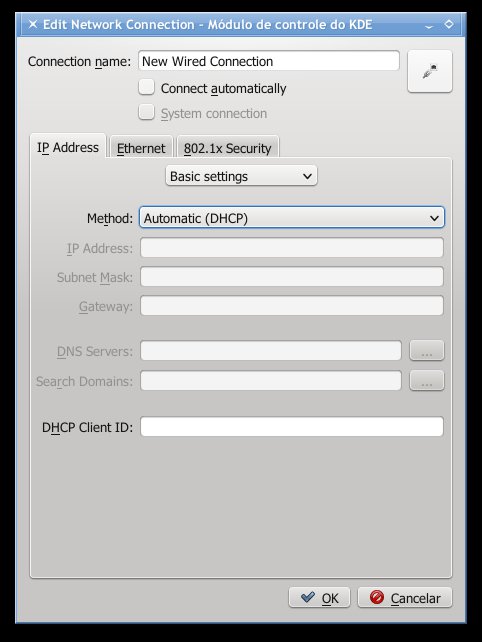
As I could see in command line NM shows very few information about my ethernet connection:

For instance it does not show the autoconnect state or if the interface should use DHCP or not. I suppose autoconnect and DHCP are default states, so they are not shown.
I think I can finish a working implementation by the end of this week and post it in git.reviewboard.kde.org for suggestions.
Sunday, March 6, 2011
Plasma NM: small feature
In the last days I have been trying to figure out how to "enable" Mobile Broadband modems by default. By "enable" I mean make the modem powers up when it is attached to the computer. NetworkManager and ModemManager require the modem to be "enabled" before using it.
I have always thought it should be something simple like modem = Solid::Control::ModemManager::findModemInterface(...); modem->enable(true). Actually that sample code works... for root only. ModemManager protects most of its DBus interface through policy-kit, so I had to figure out how to do it for normal users without asking for a password. As you probably know, Plasma NM run as normal user, not root. Time to take a look at how nm-applet does that.
After some digging in nm-applet source code I found this function nm_client_wwan_set_enabled. I have never seen that "wwan" interface in NetworkManager specification, the public specification did not mention it some days ago. In the end I figured out wwan is a synonym for mobile broadband. Today I have looked at the specification site again and now there is a 0.9 specification that mentions wwan, although NetworkManager 0.8 supports wwan but the 0.8 specification does not mention that, cool, huh?
Anyway, now that I know those functions are there, I have updated Solid::Control::NetworkManager to make use of them. The changes are already in kde://kde-workspace and kde://networkmanagement, they are going to be available in KDE SC 4.7. The visual changes in Plasma NM are very small, just a new checkbox called "Enable mobile broadband". The checkbox is visible only when there is at least one Gsm/Cdma modem attached. Following the same idea, I have changed the "Enable wireless" checkbox to also be visible only when there is at least one wireless card attached.
When you attach a modem to your computer ModemManager disables it by default. NetworkManager disables wwan if all modems are disabled, which means everytime you attach a modem NM will disable wwan. Even worse, if you have two modems, attach the first, enable wwan, attach the second modem, NM will disable wwan because the last modem is disabled. Nm-applet also demonstrates the same behavior in my tests. I think that explains why sometimes when my notebook is connected through 3G and I attach my cellphone in "PCSuite mode" to my notebook the 3G connection drops. To workaround the enable/disable problem I am using a QTimer::singleShot(...) to enable wwan after NM disables it if the mobile broadband checkbox is checked. Seems to work.
Now that I can enable/disable wwan the next thing to implement is saving the plasmoid configuration. Plasma NM is splitted into two parts, one plasmoid and a kded module. The kded module already saves its configuration, it is responsible to talk to NetworkManager and ModemManager and manages all interfaces. Of course the plasmoid is the user interface, it does not save its configuration yet, that is why everytime you resume from ram or disk the wireless state is on, it is on because your computer's BIOS set it to on, not Plasma NM. Plasma NM just reads the wireless state from NetworkManager.
The plasmoid state is just those three checkbox (Networking, Wireless and Mobile Broadband). I plan to save those three state to a configuration file and restore them when Plasma NM is started or resumes from ram/disk. So if the user set wwan to enable and attaches a modem to his/her computer, the modem will be be enabled after a short flux of DBus calls. Use dbus-monitor to see what I am talking about :-)
I have always thought it should be something simple like modem = Solid::Control::ModemManager::findModemInterface(...); modem->enable(true). Actually that sample code works... for root only. ModemManager protects most of its DBus interface through policy-kit, so I had to figure out how to do it for normal users without asking for a password. As you probably know, Plasma NM run as normal user, not root. Time to take a look at how nm-applet does that.
After some digging in nm-applet source code I found this function nm_client_wwan_set_enabled. I have never seen that "wwan" interface in NetworkManager specification, the public specification did not mention it some days ago. In the end I figured out wwan is a synonym for mobile broadband. Today I have looked at the specification site again and now there is a 0.9 specification that mentions wwan, although NetworkManager 0.8 supports wwan but the 0.8 specification does not mention that, cool, huh?
Anyway, now that I know those functions are there, I have updated Solid::Control::NetworkManager to make use of them. The changes are already in kde://kde-workspace and kde://networkmanagement, they are going to be available in KDE SC 4.7. The visual changes in Plasma NM are very small, just a new checkbox called "Enable mobile broadband". The checkbox is visible only when there is at least one Gsm/Cdma modem attached. Following the same idea, I have changed the "Enable wireless" checkbox to also be visible only when there is at least one wireless card attached.
When you attach a modem to your computer ModemManager disables it by default. NetworkManager disables wwan if all modems are disabled, which means everytime you attach a modem NM will disable wwan. Even worse, if you have two modems, attach the first, enable wwan, attach the second modem, NM will disable wwan because the last modem is disabled. Nm-applet also demonstrates the same behavior in my tests. I think that explains why sometimes when my notebook is connected through 3G and I attach my cellphone in "PCSuite mode" to my notebook the 3G connection drops. To workaround the enable/disable problem I am using a QTimer::singleShot(...) to enable wwan after NM disables it if the mobile broadband checkbox is checked. Seems to work.
Now that I can enable/disable wwan the next thing to implement is saving the plasmoid configuration. Plasma NM is splitted into two parts, one plasmoid and a kded module. The kded module already saves its configuration, it is responsible to talk to NetworkManager and ModemManager and manages all interfaces. Of course the plasmoid is the user interface, it does not save its configuration yet, that is why everytime you resume from ram or disk the wireless state is on, it is on because your computer's BIOS set it to on, not Plasma NM. Plasma NM just reads the wireless state from NetworkManager.
The plasmoid state is just those three checkbox (Networking, Wireless and Mobile Broadband). I plan to save those three state to a configuration file and restore them when Plasma NM is started or resumes from ram/disk. So if the user set wwan to enable and attaches a modem to his/her computer, the modem will be be enabled after a short flux of DBus calls. Use dbus-monitor to see what I am talking about :-)
Monday, February 28, 2011
Plasma NM: notifications
Notifications is a feature that several KDE programs use, even the old Knetworkmanager implements it. Plasma NetworkManagement did not implement it, until now. This weekend I have enabled notifications in Plasma NM. Most of the code is shared with Knetworkmanager, so I did not have to implement that much of code. I have also removed two notifications that did not make much sense since a third notification gives the same information.
Three notifications listed in networkmanagement.notifyrc have never been implemented, which also affects the old Knetworkmanager. After a few hours I finished to implement those three notifications. All notifications seem to be working, so, enjoy :-)
As requested here is a screencast of the notifications working. I added some strings to Plasma NM that have not been translated yet (my desktop is in Brazilian Portuguese), so do not worry about the missing string in the activating notification, it will appear once the string is translated. There are some minor improvements that could be done too.
OBS: I reduced my screen resolution from the original 1600x900 to 800x600 to make the fonts readable.
Three notifications listed in networkmanagement.notifyrc have never been implemented, which also affects the old Knetworkmanager. After a few hours I finished to implement those three notifications. All notifications seem to be working, so, enjoy :-)
As requested here is a screencast of the notifications working. I added some strings to Plasma NM that have not been translated yet (my desktop is in Brazilian Portuguese), so do not worry about the missing string in the activating notification, it will appear once the string is translated. There are some minor improvements that could be done too.
OBS: I reduced my screen resolution from the original 1600x900 to 800x600 to make the fonts readable.
Friday, February 18, 2011
Back to KDE work
After a couple of months busy with other stuff now I have more time to spent on blogging. During the last weeks I have been working to fix some bugs in Plasma NM (bugs 264607, 266097, 210878), Kopete (bugs 234000, 260892, 263181, 256667, 265811, 266559 and commit 1218860) and kde-workspace (bug 264534 and 231195). All fixes are going to be in KDE SC 4.6.1. There are other bugs I am investigating, not all of them will be fixed by 4.6.1 release date though.
Saturday, January 29, 2011
Symbian Modding 2
I have installed HX-V11 firmware on my phone and like most of it. One thing that I did not like was the theme used by Orange Tsunami homescreen, so I decided to change it a bit using siscontents. This is the result:


Maybe I will change the bottom bar's icons, for now it is almost as I would like it. If you wanna try it the installation file is here. Remove the _.txt file extension before copying it to the phone.
Update: now it is better :-)

Update 2: Tsunami + Widgetizer

Update 3

Friday, January 21, 2011
Samsung i8910 cellphone and Linux
Synchronizing contacts in the command line
- Install program syncml-ds-tool. In my case it comes in the libsyncml-0.5.2 ebuild (package in Gentoo's jargon).
- Create an empty directory called contacts.
- Connect the i8910 to the USB port in "PC Suite" mode.
- Execute the script below:
File sync_contacts.sh#!/bin/sh syncml-ds-tool -u 0 --identifier 'PC Suite' --version 1.1 --wbxml \ --username '' --password '' --useStringTable --remoteWinsConflicts \ --slow-sync text/x-vcard Contacts $(pwd)/contacts/
One file per contact will be created in the contacts directory. They are in vCard 2.1 format, you can edit them with your prefered text editor. To upload the changes to the phone:
- Delete all contacts from you phone (yes, that is right). To delete them go to Contacts -> Options -> Mark/Unmark -> Mark all, then Options -> Delete.
- Execute the same script above.
One alternative to deleting all phone's contacts is removing the "--remoteWinsConflicts" option and executing the script above. I prefer to use the first method because sometimes removing "--remoteWinsConflicts" makes contacts appear twice in the phone or in the contacts directory.
You can use KDE's KAddressbook to edit the contacts. When I have more time I will write how to do that.
Synchronizing contacts using KDE's Akonadi
Well, this is yet to be written since it is not officially working. There is an old version that works somewhat, but is not reliable so we have better wait.
Using the phone as bluetooth modem
If you use Linux and KDE follow the instructions in here, if not keep reading :-)
Ok, now it connects and I can surf the web, I am connected through bluetooth now. What I did:
udev/bluethood do not create the /dev/rfcommX, I had to create it and connect it manually to my phone:
#mknod --mode=666 /dev/rfcomm0 c 216 0
#rfcomm connect 0 <phone's mac address> 4
The number 0 in the rfcomm command means rfcomm0. The number 4 is the channel. To find the correct channel do:
evolucao ~ # sdptool search DUN
Inquiring ...
Searching for DUN on 00:23:D4:2E:13:B8 ...
Service Name: Dial-Up Networking
Service RecHandle: 0x1001f
Service Class ID List:
"Dialup Networking" (0x1103)
Protocol Descriptor List:
"L2CAP" (0x0100)
"RFCOMM" (0x0003)
Channel: 4
Language Base Attr List:
code_ISO639: 0x454e
encoding: 0x6a
base_offset: 0x100
Profile Descriptor List:
"Dialup Networking" (0x1103)
Version: 0x0100
DUN means bluetooth dial-up network.
then you can use wvdial: using /dev/rfcomm0 as Modem parameter.
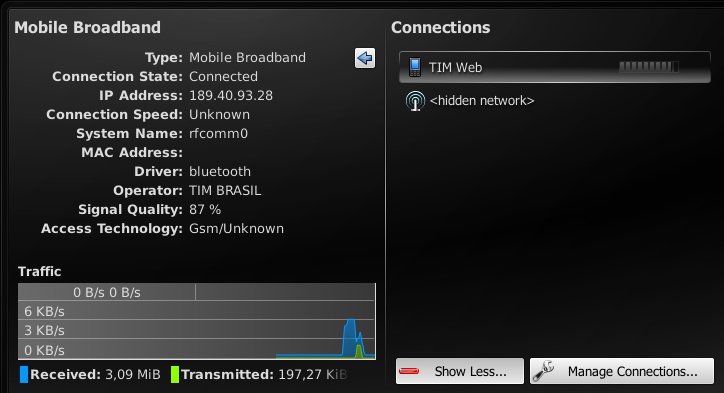
It also works with KDE's Plasma NetworkManagement and ModemManager-0.4:
Using the phone as Bluetooth GPS
To do that you need:
. python and python script shell 2.0.0 signed by Nokia with full capability. Most python install files out there do not have Location capability, which rises "permission denied" errors when any python program tries to access the internal GPS. Probably this also happens with Java programs, which would affect ExtGPS. The needed files are Python_2.0.0.sis and PythonScriptShell_2.0.0_high_capas.sis. Install them on C:
. download s60_as_bt_gps.py and locationrequestor_3rd.sis. I had to add some fixes to s60_as_bt_gps.py to prevent it from crashing. The changes are simple: 1. In line 34 change "import socket" to "import btsocket as socket"; 2. In line 320 add a "if len(args) > 7:", in the following 5 lines add a tab to ident the if (Python requires that to accept the if); 3. In line 332 do the same, add "if len(args) > 13:" and ident all lines until the line with "###########"
. Install the .sis and copy s60_as_bt_gps.py to C:/Data/Python/ using X-plore for instance.
. turn Bluetooth on.
. run Python Scriptshell and from there run s60_as_bt_gps.py.
. click on Options -> Accept Connections.
That is it. The bluetooth service should be available now on channel 10.
Importing GPS data into GoogleEarth
I also managed to import the data into GoogleEarth running in my Linux installation. I have not tried to do that in Windows. I used the information here, although I had to fix the python script available in that page (gegpsd-0.2.py) because the script in the phone exports the GPS data in a different NMEA type. It is not that hard to fix it, you just need to understand the fields in the two NMEA types used by the phone ($GPGGA) and the script ($GPRMC).
To attach the phone's bluetooth NMEA service to Linux you need to execute as root:
rfcomm bind /dev/rfcomm0 00:11:22:33:44:55 10
where 00:11:22:33:44:55 is your phone's bluetooth MAC address and 10 is the channel the 60_as_bt_gps.py script got from Symbian bluetooth service (it may not be 10).
Then you need to edit the gegpsd-0.2.py file and change the serial_port variable to /dev/rfcomm0, the field number 3 to 2 (latitude), 5 to 4 (longitude), 4 to 3 (North/South switch), and 6 to 5 (West/East switch) in the datablock variable, and change $GPRMC to $GPGGA. The $GPGGA type does not indicate speed so you can ignore this value.
Then is just run the gegpsd-0.2.py script and import the gps.kml file available on that page into GoogleEarth. It is a bit slow but it works :-)
Subscribe to:
Posts (Atom)