Search This Blog

Wednesday, October 6, 2010

Plasma NM: Mobile Connection Wizard commited


Last night I commited the Mobile Connection Wizard patch, now Plasma NM can configure 3G connections (GSM and CDMA) easily. You can test the changes by checking out trunk Plasma NM (revision r1182930 at least) or waiting until distributions create unstable packages with the changes. In Gentoo you can try it out using knetworkmanager-9999 ebuild in kde overlay:
layman -a kde # or -s kde if you already added it
# edit /etc/make.conf to add layman's configuration
echo "kde-misc/knetworkmanager **" >> /etc/portage/package.keywords
emerge -v =knetworkmanager-9999
With other distributions you need to checkout trunk Plasma NM or wait for the compiled package to appears in the repositories for unstable packages:

svn checkout svn+ssh://svn.kde.org/home/kde/trunk/extragear/base/networkmanagement

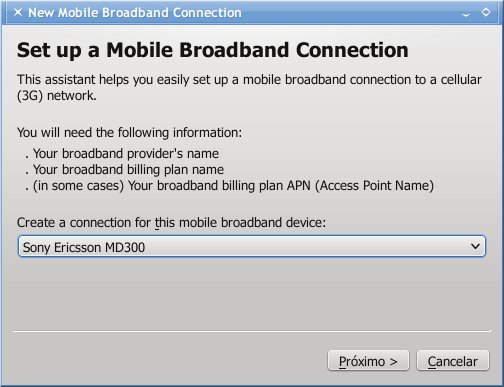
I tried to fix as most bugs as possible during Solid Sprint, there are still some minor things I want to change in the code, but I think it is ready for production. So have fun with it. Bugs can be reported through bugs.kde.org. I tested the code using KDE SC 4.5.1 and is very likely that it also works with 4.4.x. The only dependency I added is Qt-xml for parsing the mobile-broadband-provider-info file. The screenshots are the same as in the last post I wrote about it.

Monday, October 4, 2010

Solid Sprint: On the way home

After an explendid time in Madrid I am on my way home to Belo Horizonte (Brazil) and from here to Divinópolis (by car), where I live in. I left Madrid about twelve hours ago and I am waiting in São Paulo for my flight to Belo Horizonte (9:10 UTC right now), which will leave São Paulo in two and a half hours, so I have plenty of time to blog a little. I do not need to say that I am very tired now, specially after sleeping only three hours between Saturday and Sunday and after a long flight to São Paulo.

I really like Madrid and the guys from Ufocoders, thanks for hosting Solid Sprint. Metalworks did a leap in Solid for the next KDE SC version, 4.6 is gonna have a lot of nice features, at least from Solid point of view :-) From my part I have finished the Mobile Connection Wizard (MCW) to configure 3G connections using the two major technologies (GSM and CDMA). Unfortunately I do not have a CDMA device and the state where I live in, Minas Gerais, which is as large as France, does not have any CDMA deployment :-/ so it is impossible for me to test it. Even the CDMA part of the ModemManager backend is untested for the same reason, so if someone from US, India, China, or even other states in Brazil, where CDMA is more common wanted to do me a favour and test connecting using Plasma NM would be great. I am going to commit MCW when I get home, there is still some final polishing to do.

The other task I self-assigned to me is fixing a bug in Plasma NM that makes kded4 to crash when NetworkManager restarts. After some talk to Kevin and Will Stephenson I managed to reproduce the bug in my notebook and started debugging. What I have found so far is that two activatables are left when NM stops, which I think should not happen, all of them should be removed in that case. Since I was very tired yesterday night (before my flight to Brazil), I postponed this task until I get some rest.

So that is it for now and the commits are coming this week :-)

Update (16:25 UTC): finally I got to my friend's apartament in Belo Horizonte, I am going to Divinópolis tomorrow, now I need some sleep.

Thursday, September 30, 2010

And the thrilling continous...

Well, I tried to post a paragraph yesterday but Opera Mobile in my Samsung i8910 posted only the title. I was using Opera mobile because I was inside the plane that brought me to Madrid waiting for it be fixed. There was a problem in the plane's air-conditioner and it took almost two hours to be detected and fixed. The plane was already going to the runway when the problem was detected. After the strike in Madrid, which really lasted one day, I thought what else could happen to me during this trip to Europe :-) Fortunately everything is going quite well and I hope Solid Sprint bings new bug fixes and features to KDE. Metal workers are doing their best here, the results are showing up as I write this...

Solid Sprint starts tomorrow

Here I am at São Paulo international airport waiting for my flight to Madrid, which is going to take off in two and a half hours :-/ I am travelling alone and there isn't much things to do here. I arrived here three hours ago and finished to do everything I needed to, including my notebook at Receita Federal (or a risked it being confiscated when I return to Brazil next week). I have found a good spot here at the last floor, near a power outlet and the terrace. I can see most of the airport from here. There are few people here, which is good, now I can type my password on the sites I access without anybody looking at me :-) I am arriving in Madrid tomorrow around 12:15 (local time), so I already missed Sebas presentation in Madrid tonight :-/ Well, the Solid Sprint starts tomorrow and I will be there :-)

Tuesday, September 21, 2010

E-sata and Solid


Some days ago a guy asked in the kde-hardware-devel mailing list how to make disks connected to an e-sata port to behave like removable disk in KDE. I have a notebook (Sager np7652) with one e-sata port and had this problem too, but have never tried to fix that, until now. I think what I have found can help other people too so I am writing this post.

After some tries I found a way to tell hald that my disks' partitions come from a removable disk. That works but have an inconvinience, I needed to create one configuration file per partition. Some more tries and finally I got to configure hald to treat all disks connected to my e-sata controller as removable:

  1. Add this file to your system:

    File /etc/hal/fdi/policy/40-e-sata.fdi
    <?xml version="1.0" encoding="ISO-8859-1"?> <!-- -*- SGML -*- -->
    
    <deviceinfo version="0.2">
      <device>
        <match key="linux.sysfs_path" contains="/sys/devices/pci0000:00/0000:00:1f.2/host4/">
          <merge key="volume.ignore" type="bool">false</merge>
          <merge key="@block.storage_device:storage.removable" type="bool">true</merge>
        </match>
      </device>
    </deviceinfo>
    
  2. Change the contains part to match your e-sata controller's. You can find it using the command:
    Code
    evolucao ~ # find /sys/devices/ -name sdb
    /sys/devices/pci0000:00/0000:00:1f.2/host4/target4:0:0/4:0:0:0/block/sdb
    
  3. Restart hald: /etc/init.d/hald restart
  4. That's it :-)

The strange thing is that the file /sys/class/block/sdb/removable contains 0, it should contains 1 since the disk is removable. Maybe it is a kernel bug.

Hal is deprecated for some years now, KDE SC, more precisely Solid, is the only desktop/library that uses it extensively. When we, Solid metal-workers, finish Solid transition to udisk and upower probably hal is gonna vanish for ever.

In less than two weeks there will a Solid Sprint in Madri (Spain), I will be there :-), and we are going to discuss how far we are from the end of this transition. Honestly I like hal, it is flexible from users point of view. I have never used udisk and I do not know if it possible to workaround a problem in the kernel such as this one about disks connected to a e-sata controller using udisk. I hope it is.

Sunday, September 12, 2010

Plasma NM: Mobile Connection Wizard

Hi all, two months ago I said I was working on the porting of the nm-applet's connection wizard to Plasma Network Manager. The first part is almost done:

Vendor and model name only appear if Plasma NM has been compiled with ModemManager support and if ModemManager has already enabled the device. If neither of those conditions has been satisfied then "Installed GSM device" it will appear instead. By default ModemManager allows only root to enable devices, so I cannot enable them in the wizard. Solid also does not return my modem's vendor and model names. Maybe Network Manager can help me here.

I had to recreate the code from scratch because last month I deleted all what I had done by accident :-/

I still need to fix some bugs in the wizard and make the code cleaner. I also have thought  in prettifying the wizard but QWizard does not have many options to do that. For instance, I would like to use images instead of the < and > characters, but I as far as I know there is no way to do that. nm-applet's wizard also uses a blue background in the page's title ("Choose your Provider" in this screenshot) and a frame around the widgets, it looks good in my opinion. So far I have not found how to do that neither.

I am using QDomDocument to parse /usr/share/mobile-broadband-provider-info/serviceproviders.xml, it really simplifies the code. Talking about code, nm-applet's wizard is a difficult to read code, lots of macros and options to functions, several things done "by hand", which in Qt is a simple method call.

The next step is salving the options, but I will reorganize the code first, maybe next weekend. I still need to add the code to get data for CDMA connections and some more code to hide/show the widgets that should not appear in such case (CDMA connections does not use APN for instance). There are a lot of small things to do yet, so "keep walking" :-)

Thursday, September 9, 2010

Symbian Modding

This week I changed my i8910's firmware from HX to n2o4. n2o4 has very fast kastor effects so I like it at first, but I do not like some other things: the theme is too "yellow" to my taste and I like the icon's white border in the original Nero II theme, which I use with HX. The problem is that I also like to listen to radio but Nero II (and all other Morkino's theme I have used so far) has a problem that radio frequency does not appear. Yesterday I tried to solve this problem and finally I got success :-). What I did is:


  1. Install siscontents160b
  2. Open Nero_II_HD_.sis
  3. Click on the icon "Contents"
  4. Select the file "themepackage.skn" in the contents
  5. Click on View details
  6. Then on "Colours" tab
  7. Then on "Add colour groups" and select "Samsung Text Colours". You can keep the default colours or change it for your taste
  8. Click on "Close"
  9. Click on "File" menu entry, then "Save as..."
  10. Install the fixed theme :-)


I have also changed the homescreen toolbar icons to fit Nero II using these steps. This is the result:


Pra quem estiver interessado fiz upload do arquivo "Message 1.aac" que uso como tom para chegada de mensagens.